Skip to content
  • Facebook
  • Instagram
  • LinkedIn

Free shipping over $500!

Free U.S. shipping on most orders over $500!

$25 off $500+ · LAUNCH25

Launch offer: $25 off $500+ with LAUNCH25 · $50 off $1,000+ with LAUNCH50

$50 off $1,000+ · LAUNCH50

Bigger builds: $125 off $2,500+ with LAUNCH125 · $250 off $5,000+ with LAUNCH250

$125 off $2,500+ · LAUNCH125

Don't see it on the site? We can get it — e-mail us for a quote on the gear you need!

$250 off $5,000+ · LAUNCH250

Competitive pricing with a focus on service and knowledge.

  • All Products
  • Shop by Category
  • Shop by Brand
Login
  • Facebook
  • Instagram
  • LinkedIn
Search
CineBitsCineBits full lockup, white ink with gold tagline, transparentCineBits full lockup, white ink with gold tagline, transparentCineBits full lockup, white ink with gold tagline, transparentCineBits full lockup, white ink with gold tagline, transparent
  • All ProductsAll Products
  • Shop by CategoryShop by Category
      • Rigging
      • Monitors
      • Video
      • Audio
      • Storage
      • Cables
      • Power
      • Lenses
      • Cameras
      • Transport
      • Lighting
  • Shop by BrandShop by Brand
Search Login Cart 0
Cart

Your cart is currently empty.

  • Continue shopping
Spend $500.00 more to reach free shipping!
    Order special instructions
    Estimate shipping
    Discount
      Taxes and shipping calculated at checkout
      Subtotal
      $0.00 USD
      View cart
      Recently viewed
      Search

      We use cookies

      This site uses cookies for better user experience and analytics. View our privacy policy for more info.

      OWC Thunderbolt Hub 5-Port Connectivity Solution
      OWC Thunderbolt Hub 5-Port Connectivity Solution
      OWC Thunderbolt Hub 5-Port Connectivity Solution
      OWC Thunderbolt Hub 5-Port Connectivity Solution
      OWC Thunderbolt Hub 5-Port Connectivity Solution
      OWC Thunderbolt Hub 5-Port Connectivity Solution

      More Thunderbolt. More USB-C. Simple.
      We heard you loud and clear. You simply want to add more universally compatible Thunderbolt (USB-C) ports to your Mac, PC, iPad, or dock so you can connect more devices and create an expanded workflow that is as unique as your imagination.

      Connect more storage, displays, and accessories. Create independent daisy chains. And do it all while charging your notebook. With the OWC Thunderbolt Hub, you can massively increase your productivity and connectivity while enjoying the same performance of your Thunderbolt and USB-C devices as if you had plugged them directly into your machine. In short, you get everything you want without compromise or unnecessary features.
      More (way more!) Than the Average Hub

      The average cheap bus-powered hub doesn’t have the all-important 3P’s of the OWC Thunderbolt Hub: Power, Performance and Possibilities. Plug in a Thunderbolt external drive, and you’ll get Thunderbolt speeds. Plug in a 6K XDR monitor, and you’ll get full resolution. Plug in a USB-C bus-powered drive, and it will work flawlessly. Try all that with any other hub, and like the chart shows below, your use possibilities are severely limited.

      OWC Thunderbolt Hub USB-C Hub (10Gb/s) USB-C Hub (5Gb/s)
      Performance 40Gb/s 10Gb/s (4x slower) 5Gb/s (8x slower)
      Laptop Charging
      4K Display
      4K 120Hz Display
      Dual 4K Displays
      5K Display
      6K Apple Pro Display XDR
      8K Display
      Thunderbolt Daisy-Chain
      Thunderbolt Compatible
      USB Compatible
      Support 24/7 Talk-to-a-Human
      Award-Winning Support
      Company Established 1988
      Why did we build the Thunderbolt Hub?

      Works with Millions of Computers and Devices

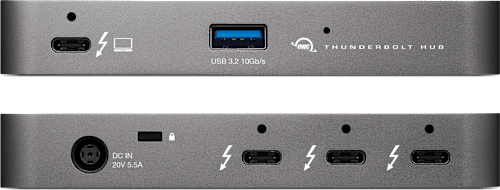
      See those ports? Yeah, they all use a USB-C connector. Which means you never have to worry or wonder about if the OWC Thunderbolt Hub will work with your Thunderbolt 4, Thunderbolt 3, USB-C, or USB4 machine or device. It’s the perfect hub to simply provide all your C-to-C connectivity needs with 100% compatibility.

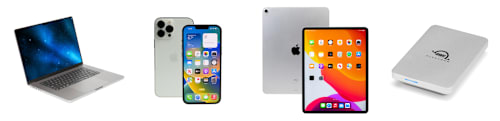
      With its universal compatibility For All Computerkind™, the OWC Thunderbolt Hub also functions as a USB-C hub for expanding the capabilities of USB-C computers and devices. Or, use this versatile hub to completely transform your USB-C tablet or phone into a desktop-like powerhouse by adding an external display, keyboard, mouse, and external drive.
      Made for Your Unique Workflow Needs
      The OWC Thunderbolt Hub was intended for a specific workflow. Yours.

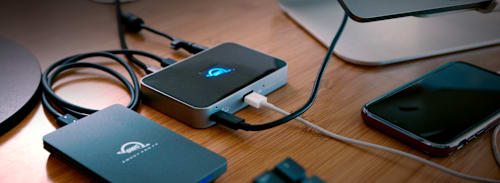
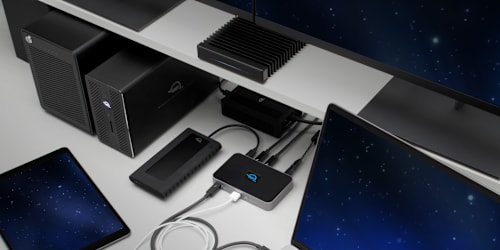
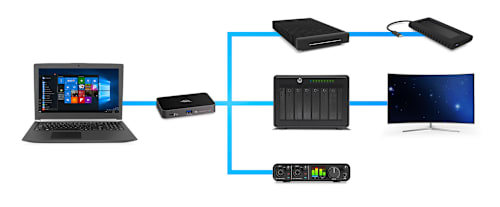
      Multiply the port potential of your Mac, PC, Chromebook, and tablet to create a connectivity platform that meets and exceeds your unique workflow needs now and beyond...

      • Add up to two 4K monitors (see below)
      • Add portable SSD storage
      • Add large desktop RAID storage capacity
      • Add a Thunderbolt 1/2/3/4 or USB-C dock for more port options1
      • Add an SD or CFexpress Card Reader
      • Add a 10Gb/s Ethernet adapter
      • Add a video display (HDMI, mDP, VGA) adapter
      • Add a digital audio interface

      Simply a Higher Vision

      Thanks to the versatility Thunderbolt technology provides, you can enjoy direct plug & play simplicity when connecting any USB-C, Thunderbolt 3, or Thunderbolt 4 equipped display. You can also expand your display connectivity options via HDMI, DisplayPort, Mini DisplayPort (mDP), VGA, or DVI by connecting any compatible USB-C or Thunderbolt video display adapters.

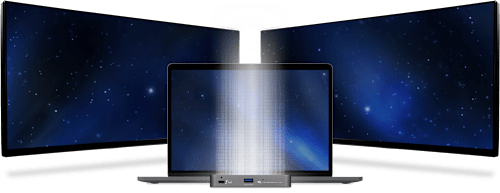
      The OWC Thunderbolt Hub lets you connect to a single 5K/6K/8K display, or up to two 4K displays. Enjoy more precise and vivid details in graphic-intensive CAD drawings. Take your Photoshop or Affinity Photo images up a notch. Edit large format video on one display, while previewing the raw playback on the other. Attend a video meeting on one screen while editing content on another screen. Whatever your workstation display needs, the OWC Thunderbolt Hub gives you the connectivity you need to execute your vision.2

      A Resolutionary Idea
      Whether your computer or tablet is sporting the latest technology or is a few years loved, the OWC Thunderbolt Hub gives you multiple options to expand your visual horizons:

      Single and Dual Display Support

      4K @ 30Hz 4K @ 60Hz Dual 4K @ 60Hz 5K @ 60Hz
      (Apple Studio Display or LG Ultrafine 5K)
      Dual 5K @ 60Hz
      (Apple Studio Display)
      6K @ 60Hz
      (Apple Pro XDR)
      Dual 6K @ 60Hz
      Apple Pro XDR
      8K @ 60Hz
      Apple silicon Mac (M1, M2)3
      Apple silicon Mac (M1 Pro, M1 Max, M1 Ultra, M2 Pro, M2 Max)3
      Intel Mac with Thunderbolt 33

      1

      2

      iPad Pro or iPad Air with Thunderbolt4
      iPad Pro with USB-C4
      iPad Air with USB-C4
      Chromebook
      Windows PC with Thunderbolt 4
      Windows PC with Thunderbolt 3 / USB45
      Windows PC with USB-C (10Gb/s with DisplayPort)
      Windows PC with USB-C (5Gb/s with DisplayPort)
      Windows Tablet
      1. See Apple Studio Display specs for detailed Mac model support.
      2. See Apple Pro Display XDR specs for detailed Mac model support.
      3. OWC highly recommends that you verify the display support for your specific Mac model:
        • Identify your MacBook Pro model
        • Identify your MacBook Air model
        • Identify your Mac mini model
        • Identify your iMac model
        • Identify your Mac Studio model
        • Identify your Mac Pro model
      4. OWC highly recommends that you verify the display support for your specific iPad model:
        • Identify your iPad model
      5. OWC recommends that you verify the display support for your PC's Thunderbolt port. Some refresh rates require DisplayPort 1.4 HBR3 and DSC 1.2 support from the display and the host. Not all Thunderbolt ports support DisplayPort 1.4 – some are limited to DisplayPort 1.2, which may reduce refresh rate or resolution support.

      “The OWC Thunderbolt Hub was the missing puzzle piece to my desktop Mac setup.”

      - 9to5Mac

      1st one so good, I bought a 2nd

      I bought my first Thunderbolt Hub a year or so ago to use with my 13" MacBook Pro M1. I recently acquired a Mac mini M1 (as a temporary replacement after I sold my Intel iMac and ordered a Mac Studio) and bought a 2nd hub to expand the paltry Thunderbolt port options on the mini. This works like a charm in both cases. It will migrate to the new Mac Studio, should it ever ship.... I have yet to be dissatisfied with OWC products!

      Fantastic technical support
      I consulted technical support prior to making a purchase decision. Their advice was detailed, wise and reassuring. Purchasing the Thunderbolt 4 hub was the best expansion for my 2018 Mac mini.

      Perfect little device!
      This little hub does exactly what it says it will do and is a great additional to your iMac or any device needing additional thunderbolt or usb C ports. The added usb 3 port is great also!

      Just the right solution
      The iMac with two thunderbolt ports needs a bit of help and this little box does the trick for a reasonable price. Adding an extra monitor and a hard drive array is a breeze.
      Connection Without Compromise

      The latest Thunderbolt interface uses a universal USB-C connector to transfer data, output video, and charge devices through the same cable. The OWC Thunderbolt Hub’s Thunderbolt ports use that same USB-C connector to create a multi-connectivity solution for millions of existing and future Thunderbolt and USB-C computers and devices. Plus, the ports are fully USB4 future compatible.

      The OWC Thunderbolt Hub is a plug and play safe solution for connecting any Mac, PC, iPad, Chromebook, Ultrabook, tablet or smartphone with a Thunderbolt 3, Thunderbolt 4, USB-C, or USB4 port to any compatible device, display, or power supply.

      USB-C
      Connect via Thunderbolt to experience the full 40Gb/s bandwidth your computer supports.

      Connect via USB-C 10Gb/s (non-Thunderbolt) to experience the full 10Gb/s bandwidth your computer supports.

      Redefine the Daisy Chain

      The OWC Thunderbolt Hub lets you create three separate daisy chains of Thunderbolt, USB4 and USB-C devices. Now you can remove devices from one chain without affecting or disconnecting the others. You can even add three bus-powered Thunderbolt devices. Have a USB-C only computer? No problem…you can daisy chain USB-C devices!
      Take Charge of Your Devices

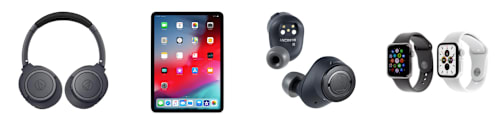
      Surrounded by heat-dissipating anodized aluminum and capped off with a glossy black top, the OWC Thunderbolt Hub runs silently cool while elegantly complementing your desktop. Its real beauty comes into play when you’re taking a short break or are done for the day. After your computer goes into sleep mode, the OWC Thunderbolt Hub continues to power and/or charge your connected devices.
      Value. Quality. Reliability.
      That’s The OWC Difference

      Our mission has always been to provide you with the highest quality, highest performance products that simply work. There’s a priceless value in knowing you can depend on the OWC Thunderbolt Hub to deliver a best-in-class experience. Check out how it stacks up to other options (and if you need more ports we have a recommendation!)

      OWC Thunderbolt Hub

      Sold Out

      CalDigit Hub

      $249.99

      OWC Thunderbolt Dock

      Sold Out

      Thunderbolt 4 Ports 4 (40Gb/s) 4 (40Gb/s) 4 (40Gb/s)
      Works with Thunderbolt 4 + USB4 + Thunderbolt 3 + USB-C
      Power Management 60W Smart Dynamic Charging prioritizes connected device power to ensure zero data loss 60W non-dynamic power 96W of power
      Laptop Charging
      Max. Monitors Supported 2 2 2
      Monitor Resolutions 2K/4K/5K/6K/8K 2K/4K/5K/6K/8K 2K/4K/5K/6K/8K
      ClingOn Compatible
      USB-A Ports 1 (10Gb/s) 4 (10Gb/s) 3 (10Gb/s) + 1 USB 2.0
      Use as a USB-C Hub
      SD Card Slot
      Gigabit Ethernet
      Audio In/Out Port
      Security Lock Slot
      Thunderbolt Cable
      Support 24/7 Talk-to-a-Human
      Award-Winning Support
      24/7 Talk-to-a-Human
      Award-Winning Support
      Company Established 1988 2006 1988

      “…the answer to those praying for a multi-Thunderbolt connector.”

      - Tech Advisor

      Expansion Solution!
      It was exactly what I needed to add more Thunderbolt ports to my MacBook Pro 2018. Works as described.

      Great Hub for speed
      I was looking for a way to have several of my thunderbolt drives active when video and audio editing. This was a perfect solution!

      Awesome dock

      I have not unleashed the full power of TB4 yet, but this little dock is working out well. It enables me to add multiple devices all through one port on my MacBook Pro. This enables me to keep a clutter-free setup and ports available right at my fingertips. I highly recommend.

      Great way to add more ports
      Finally got into a situation where two ports didn’t cut it - this did the trick works like a champ!

      USB-C, Thunderbolt 3, Thunderbolt 4, USB4 — What’s the Difference?

      Nowadays, there are so many different kinds of wires and connections. Watch as Michelle from Rocket Yard explores what’s what.

      Watch the video »
      What’s Apple’s “Thunderbolt / USB 4” vs. PC-Window’s Thunderbolt 4?

      I really like how Apple is presenting Thunderbolt as “Thunderbolt / USB 4“ on its latest Macs. You see, Thunderbolt 4 finally promises PC/Windows users all the features Thunderbolt 3 has long offered Apple users.

      Continue reading »
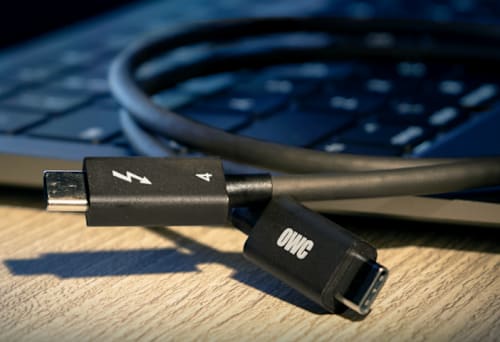
      Everything You Need to Know About Thunderbolt 4 & USB-C Cables

      Take all the guesswork out of identifying the cables you need for your technology setup with these backward-compatible cables that replace Thunderbolt 3 cables.

      OWC Dock Ejector

      Disconnect in One Click

      Safely disconnect multiple drives in a single click. OWC Dock Ejector was designed by OWC hardware and software engineers to ensure all data is written before disconnection, saving time and protecting against data loss. It makes losing your hard-earned work a thing of the past.
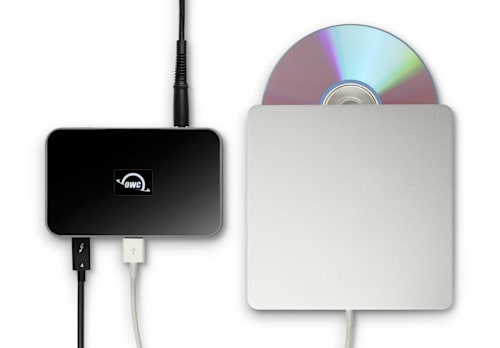
      Apple SuperDrive Ready

      Apple SuperDrive Ready

      OWC's free Dock Ejector software also includes a special driver that enables your OWC Thunderbolt Hub to play and burn CDs and DVDs with the Apple SuperDrive. Just connect the SuperDrive to an open USB-A port on the OWC Thunderbolt Hub for bus power to watch a DVD movie, listen to music CDs, create a backup disk, and install software.
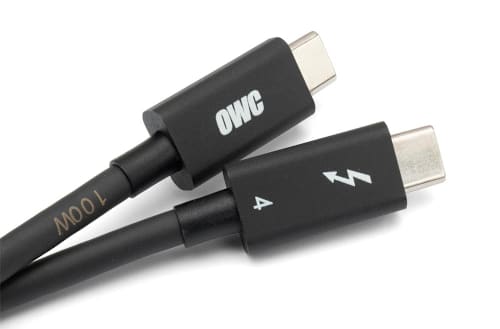
      OWC Thunderbolt Cable

      OWC Thunderbolt Cable Included
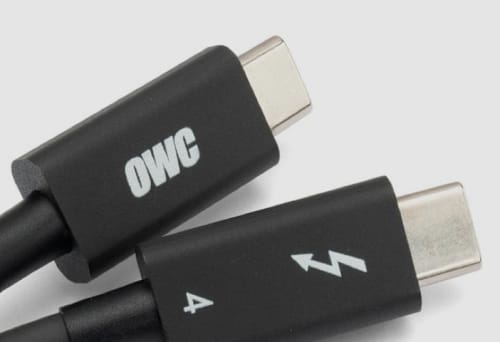
      OWC Thunderbolt Hub comes with a certified 0.8M OWC Thunderbolt (USB-C) Cable. But if your workflow demands a different length to make the connection, OWC Thunderbolt (USB-C) Cables are the perfect choice.
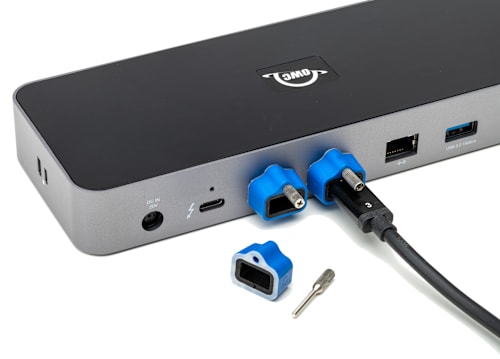
      OWC ClingOn

      Stabilize Thunderbolt and USB-C Cables with OWC ClingOn

      Active workspaces expose gear to bumps, shoves, or even the random tail wag from a pet. OWC ClingOn custom cable stabilizers (sold separately) screw into the OWC Thunderbolt Hub’s housing to reduce – if not completely eliminate – cable strain on Thunderbolt and USB-C connections so you can work with confidence even in the highest traffic environments.

      1. Connect to a port on on your Thunderbolt or USB-C dock or hub to utilize extra ports.
      2. Actual display support depends upon host. Please review the display specifications for your specific host system to determine the maximum supported resolution, refresh rate, color depth, and number of external displays over Thunderbolt or USB.
      3. Works with Thunderbolt (USB-C), Thunderbolt/Thunderbolt 2 (mDP), and USB devices. Thunderbolt/Thunderbolt 2 (mDP) device support requires a certified Thunderbolt 3 (USB-C) to Thunderbolt 2 (mDP) adapter and a Thunderbolt 2 cable (not included). This configuration provides data transfer at up to 20Gb/s but does not support notebook charging.
      • Collections
      • Dock

      Vendor: OWC OWC

      OWC Thunderbolt Hub 5-Port Connectivity Solution

      Sale price$149.99Regular price $169.99

      SKU OWCTB4HUB5P

      Available to order — allow extra processing and shipping time

      Full manufacturer warranties on everything we sell
      14-day returns on new, unopened items
      Questions? Talk to a specialist — Mon–Fri 8:30–5 ET

      More Thunderbolt. More USB-C. Simple.
      We heard you loud and clear. You simply want to add more universally compatible Thunderbolt (USB-C) ports to your Mac, PC, iPad, or dock so you can connect more devices and create an expanded workflow that is as unique as your imagination.

      Connect more storage, displays, and accessories. Create independent daisy chains. And do it all while charging your notebook. With the OWC Thunderbolt Hub, you can massively increase your productivity and connectivity while enjoying the same performance of your Thunderbolt and USB-C devices as if you had plugged them directly into your machine. In short, you get everything you want without compromise or unnecessary features.

      More (way more!) Than the Average Hub

      The average cheap bus-powered hub doesn’t have the all-important 3P’s of the OWC Thunderbolt Hub: Power, Performance and Possibilities. Plug in a Thunderbolt external drive, and you’ll get Thunderbolt speeds. Plug in a 6K XDR monitor, and you’ll get full resolution. Plug in a USB-C bus-powered drive, and it will work flawlessly. Try all that with any other hub, and like the chart shows below, your use possibilities are severely limited.

      OWC Thunderbolt Hub USB-C Hub (10Gb/s) USB-C Hub (5Gb/s)
      Performance 40Gb/s 10Gb/s (4x slower) 5Gb/s (8x slower)
      Laptop Charging
      4K Display
      4K 120Hz Display
      Dual 4K Displays
      5K Display
      6K Apple Pro Display XDR
      8K Display
      Thunderbolt Daisy-Chain
      Thunderbolt Compatible
      USB Compatible
      Support 24/7 Talk-to-a-Human
      Award-Winning Support
      Company Established 1988
      Why did we build the Thunderbolt Hub?

      Works with Millions of Computers and Devices

      See those ports? Yeah, they all use a USB-C connector. Which means you never have to worry or wonder about if the OWC Thunderbolt Hub will work with your Thunderbolt 4, Thunderbolt 3, USB-C, or USB4 machine or device. It’s the perfect hub to simply provide all your C-to-C connectivity needs with 100% compatibility.

      With its universal compatibility For All Computerkind™, the OWC Thunderbolt Hub also functions as a USB-C hub for expanding the capabilities of USB-C computers and devices. Or, use this versatile hub to completely transform your USB-C tablet or phone into a desktop-like powerhouse by adding an external display, keyboard, mouse, and external drive.

      Made for Your Unique Workflow Needs
      The OWC Thunderbolt Hub was intended for a specific workflow. Yours.

      Multiply the port potential of your Mac, PC, Chromebook, and tablet to create a connectivity platform that meets and exceeds your unique workflow needs now and beyond...

      • Add up to two 4K monitors (see below)
      • Add portable SSD storage
      • Add large desktop RAID storage capacity
      • Add a Thunderbolt 1/2/3/4 or USB-C dock for more port options1
      • Add an SD or CFexpress Card Reader
      • Add a 10Gb/s Ethernet adapter
      • Add a video display (HDMI, mDP, VGA) adapter
      • Add a digital audio interface

      Simply a Higher Vision

      Thanks to the versatility Thunderbolt technology provides, you can enjoy direct plug & play simplicity when connecting any USB-C, Thunderbolt 3, or Thunderbolt 4 equipped display. You can also expand your display connectivity options via HDMI, DisplayPort, Mini DisplayPort (mDP), VGA, or DVI by connecting any compatible USB-C or Thunderbolt video display adapters.

      The OWC Thunderbolt Hub lets you connect to a single 5K/6K/8K display, or up to two 4K displays. Enjoy more precise and vivid details in graphic-intensive CAD drawings. Take your Photoshop or Affinity Photo images up a notch. Edit large format video on one display, while previewing the raw playback on the other. Attend a video meeting on one screen while editing content on another screen. Whatever your workstation display needs, the OWC Thunderbolt Hub gives you the connectivity you need to execute your vision.2

      A Resolutionary Idea
      Whether your computer or tablet is sporting the latest technology or is a few years loved, the OWC Thunderbolt Hub gives you multiple options to expand your visual horizons:

      Single and Dual Display Support

      4K @ 30Hz 4K @ 60Hz Dual 4K @ 60Hz 5K @ 60Hz
      (Apple Studio Display or LG Ultrafine 5K)
      Dual 5K @ 60Hz
      (Apple Studio Display)
      6K @ 60Hz
      (Apple Pro XDR)
      Dual 6K @ 60Hz
      Apple Pro XDR
      8K @ 60Hz
      Apple silicon Mac (M1, M2)3
      Apple silicon Mac (M1 Pro, M1 Max, M1 Ultra, M2 Pro, M2 Max)3
      Intel Mac with Thunderbolt 33

      1

      2

      iPad Pro or iPad Air with Thunderbolt4
      iPad Pro with USB-C4
      iPad Air with USB-C4
      Chromebook
      Windows PC with Thunderbolt 4
      Windows PC with Thunderbolt 3 / USB45
      Windows PC with USB-C (10Gb/s with DisplayPort)
      Windows PC with USB-C (5Gb/s with DisplayPort)
      Windows Tablet
      1. See Apple Studio Display specs for detailed Mac model support.
      2. See Apple Pro Display XDR specs for detailed Mac model support.
      3. OWC highly recommends that you verify the display support for your specific Mac model:
        • Identify your MacBook Pro model
        • Identify your MacBook Air model
        • Identify your Mac mini model
        • Identify your iMac model
        • Identify your Mac Studio model
        • Identify your Mac Pro model
      4. OWC highly recommends that you verify the display support for your specific iPad model:
        • Identify your iPad model
      5. OWC recommends that you verify the display support for your PC's Thunderbolt port. Some refresh rates require DisplayPort 1.4 HBR3 and DSC 1.2 support from the display and the host. Not all Thunderbolt ports support DisplayPort 1.4 – some are limited to DisplayPort 1.2, which may reduce refresh rate or resolution support.

      “The OWC Thunderbolt Hub was the missing puzzle piece to my desktop Mac setup.”

      - 9to5Mac

      1st one so good, I bought a 2nd

      I bought my first Thunderbolt Hub a year or so ago to use with my 13" MacBook Pro M1. I recently acquired a Mac mini M1 (as a temporary replacement after I sold my Intel iMac and ordered a Mac Studio) and bought a 2nd hub to expand the paltry Thunderbolt port options on the mini. This works like a charm in both cases. It will migrate to the new Mac Studio, should it ever ship.... I have yet to be dissatisfied with OWC products!

      Fantastic technical support
      I consulted technical support prior to making a purchase decision. Their advice was detailed, wise and reassuring. Purchasing the Thunderbolt 4 hub was the best expansion for my 2018 Mac mini.

      Perfect little device!
      This little hub does exactly what it says it will do and is a great additional to your iMac or any device needing additional thunderbolt or usb C ports. The added usb 3 port is great also!

      Just the right solution
      The iMac with two thunderbolt ports needs a bit of help and this little box does the trick for a reasonable price. Adding an extra monitor and a hard drive array is a breeze.

      Connection Without Compromise

      The latest Thunderbolt interface uses a universal USB-C connector to transfer data, output video, and charge devices through the same cable. The OWC Thunderbolt Hub’s Thunderbolt ports use that same USB-C connector to create a multi-connectivity solution for millions of existing and future Thunderbolt and USB-C computers and devices. Plus, the ports are fully USB4 future compatible.

      The OWC Thunderbolt Hub is a plug and play safe solution for connecting any Mac, PC, iPad, Chromebook, Ultrabook, tablet or smartphone with a Thunderbolt 3, Thunderbolt 4, USB-C, or USB4 port to any compatible device, display, or power supply.

      USB-C
      Connect via Thunderbolt to experience the full 40Gb/s bandwidth your computer supports.

      Connect via USB-C 10Gb/s (non-Thunderbolt) to experience the full 10Gb/s bandwidth your computer supports.

      Redefine the Daisy Chain

      The OWC Thunderbolt Hub lets you create three separate daisy chains of Thunderbolt, USB4 and USB-C devices. Now you can remove devices from one chain without affecting or disconnecting the others. You can even add three bus-powered Thunderbolt devices. Have a USB-C only computer? No problem…you can daisy chain USB-C devices!

      Take Charge of Your Devices

      Surrounded by heat-dissipating anodized aluminum and capped off with a glossy black top, the OWC Thunderbolt Hub runs silently cool while elegantly complementing your desktop. Its real beauty comes into play when you’re taking a short break or are done for the day. After your computer goes into sleep mode, the OWC Thunderbolt Hub continues to power and/or charge your connected devices.

      Value. Quality. Reliability.
      That’s The OWC Difference

      Our mission has always been to provide you with the highest quality, highest performance products that simply work. There’s a priceless value in knowing you can depend on the OWC Thunderbolt Hub to deliver a best-in-class experience. Check out how it stacks up to other options (and if you need more ports we have a recommendation!)

      OWC Thunderbolt Hub

      Sold Out

      CalDigit Hub

      $249.99

      OWC Thunderbolt Dock

      Sold Out

      Thunderbolt 4 Ports 4 (40Gb/s) 4 (40Gb/s) 4 (40Gb/s)
      Works with Thunderbolt 4 + USB4 + Thunderbolt 3 + USB-C
      Power Management 60W Smart Dynamic Charging prioritizes connected device power to ensure zero data loss 60W non-dynamic power 96W of power
      Laptop Charging
      Max. Monitors Supported 2 2 2
      Monitor Resolutions 2K/4K/5K/6K/8K 2K/4K/5K/6K/8K 2K/4K/5K/6K/8K
      ClingOn Compatible
      USB-A Ports 1 (10Gb/s) 4 (10Gb/s) 3 (10Gb/s) + 1 USB 2.0
      Use as a USB-C Hub
      SD Card Slot
      Gigabit Ethernet
      Audio In/Out Port
      Security Lock Slot
      Thunderbolt Cable
      Support 24/7 Talk-to-a-Human
      Award-Winning Support
      24/7 Talk-to-a-Human
      Award-Winning Support
      Company Established 1988 2006 1988

      “…the answer to those praying for a multi-Thunderbolt connector.”

      - Tech Advisor

      Expansion Solution!
      It was exactly what I needed to add more Thunderbolt ports to my MacBook Pro 2018. Works as described.

      Great Hub for speed
      I was looking for a way to have several of my thunderbolt drives active when video and audio editing. This was a perfect solution!

      Awesome dock

      I have not unleashed the full power of TB4 yet, but this little dock is working out well. It enables me to add multiple devices all through one port on my MacBook Pro. This enables me to keep a clutter-free setup and ports available right at my fingertips. I highly recommend.

      Great way to add more ports
      Finally got into a situation where two ports didn’t cut it - this did the trick works like a champ!

      USB-C, Thunderbolt 3, Thunderbolt 4, USB4 — What’s the Difference?

      Nowadays, there are so many different kinds of wires and connections. Watch as Michelle from Rocket Yard explores what’s what.

      Watch the video »

      What’s Apple’s “Thunderbolt / USB 4” vs. PC-Window’s Thunderbolt 4?

      I really like how Apple is presenting Thunderbolt as “Thunderbolt / USB 4“ on its latest Macs. You see, Thunderbolt 4 finally promises PC/Windows users all the features Thunderbolt 3 has long offered Apple users.

      Continue reading »

      Everything You Need to Know About Thunderbolt 4 & USB-C Cables

      Take all the guesswork out of identifying the cables you need for your technology setup with these backward-compatible cables that replace Thunderbolt 3 cables.

      OWC Dock Ejector

      Disconnect in One Click

      Safely disconnect multiple drives in a single click. OWC Dock Ejector was designed by OWC hardware and software engineers to ensure all data is written before disconnection, saving time and protecting against data loss. It makes losing your hard-earned work a thing of the past.

      Apple SuperDrive Ready

      Apple SuperDrive Ready

      OWC's free Dock Ejector software also includes a special driver that enables your OWC Thunderbolt Hub to play and burn CDs and DVDs with the Apple SuperDrive. Just connect the SuperDrive to an open USB-A port on the OWC Thunderbolt Hub for bus power to watch a DVD movie, listen to music CDs, create a backup disk, and install software.

      OWC Thunderbolt Cable

      OWC Thunderbolt Cable Included
      OWC Thunderbolt Hub comes with a certified 0.8M OWC Thunderbolt (USB-C) Cable. But if your workflow demands a different length to make the connection, OWC Thunderbolt (USB-C) Cables are the perfect choice.

      OWC ClingOn

      Stabilize Thunderbolt and USB-C Cables with OWC ClingOn

      Active workspaces expose gear to bumps, shoves, or even the random tail wag from a pet. OWC ClingOn custom cable stabilizers (sold separately) screw into the OWC Thunderbolt Hub’s housing to reduce – if not completely eliminate – cable strain on Thunderbolt and USB-C connections so you can work with confidence even in the highest traffic environments.

      1. Connect to a port on on your Thunderbolt or USB-C dock or hub to utilize extra ports.
      2. Actual display support depends upon host. Please review the display specifications for your specific host system to determine the maximum supported resolution, refresh rate, color depth, and number of external displays over Thunderbolt or USB.
      3. Works with Thunderbolt (USB-C), Thunderbolt/Thunderbolt 2 (mDP), and USB devices. Thunderbolt/Thunderbolt 2 (mDP) device support requires a certified Thunderbolt 3 (USB-C) to Thunderbolt 2 (mDP) adapter and a Thunderbolt 2 cable (not included). This configuration provides data transfer at up to 20Gb/s but does not support notebook charging.

      Pairs well with

      OWC Thunderbolt Hub 5-Port Connectivity Solution

      OWC Thunderbolt Hub 5-Port Connectivity Solution

      Sale price$149.99Regular price $169.99
      CineBits internal — do not follow

      Downloads

      • Manual Support Manual for OWC Thunderbolt Hub

      We know the gear

      Two decades each on set and in the field — real workflow expertise, not a call center.

      Fast, free shipping

      Free U.S. shipping on most orders over $500. In-stock orders ship same day.

      Real human support

      Talk to specialists who actually use this equipment — before and after you buy.

      Secure checkout

      Your payment and personal data are protected on every order.

      CineBitsCineBits full lockup, white ink with gold tagline, transparent

      CineBits is your destination for professional AV/Cinema gear. We come from decades on set — developing workflows and battle-testing equipment — so you walk away with the right gear and the knowledge to master your craft.

      Help
      • Contact Us
      • Financing
      • Upgrade Innovations Assembly Instructions
      • Shipping & Delivery
      • Returns & Refunds
      • Terms of Service
      Industries
      • Production
      • Houses of Worship
      • Education
      • Government & Military
      • Commercial & Sports
      • Storage Rentals
      Contact
      • 866-CINE-BIT
      • info@cinebits.co
      • Mon–Fri 8:30am–5pm Eastern
      • Same Day Shipping Cutoff 1pm

      News, guides & deals delivered to your e-mail:

      • Facebook
      • Instagram
      • LinkedIn
      © 2026 CineBits LLC. 
      • Choosing a selection results in a full page refresh.
      • Opens in a new window.