Skip to content
  • Facebook
  • Instagram
  • LinkedIn

Closed Thu and Fri for Thanksgiving. E-mail us with questions!

We're closed Thursday and Friday for Thanksgiving. E-mail us with any questions, we'll be checking in periodically!

Free shipping over $500!

Free U.S. shipping on most orders over $500!

Don't see it on the site? We can get it — e-mail us for a quote on the gear you need!

Competitive pricing with a focus on service and knowledge.

  • All Products
  • Shop by Category
  • Shop by Brand
Login
  • Facebook
  • Instagram
  • LinkedIn
Search
CineBitsCineBits full lockup, white ink with gold tagline, transparentCineBits full lockup, white ink with gold tagline, transparentCineBits full lockup, white ink with gold tagline, transparentCineBits full lockup, white ink with gold tagline, transparent
  • All ProductsAll Products
  • Shop by CategoryShop by Category
      • Rigging
      • Monitors
      • Video
      • Audio
      • Storage
      • Cables
      • Power
      • Lenses
      • Cameras
      • Transport
      • Lighting
  • Shop by BrandShop by Brand
Search Login Cart 1
Cart
You are eligible for free shipping.
  • OWC Flex 1U4 49TB (1x1TB NVMe, 3x16TB HDD) Rackmount Storage/Dock/PCIe Expansion
    $4,939.99
    Remove

You may also like

Order special instructions
Estimate shipping
Discount
    Taxes and shipping calculated at checkout
    Subtotal
    $4,939.99 USD
    View cart
    Recently viewed
    Search

    We use cookies

    This site uses cookies for better user experience and analytics. View our privacy policy for more info.

    OWC 11-Port Thunderbolt Dock for Mac/PC with 96W PD and 3x Thunderbolt 4
    OWC 11-Port Thunderbolt Dock for Mac/PC with 96W PD and 3x Thunderbolt 4
    OWC 11-Port Thunderbolt Dock for Mac/PC with 96W PD and 3x Thunderbolt 4
    OWC 11-Port Thunderbolt Dock for Mac/PC with 96W PD and 3x Thunderbolt 4
    OWC 11-Port Thunderbolt Dock for Mac/PC with 96W PD and 3x Thunderbolt 4
    OWC 11-Port Thunderbolt Dock for Mac/PC with 96W PD and 3x Thunderbolt 4

    The Past, Present, and Future is Yours

    Three Thunderbolt ports and four USB ports empower you to connect to past, present and future devices. Up to two 4K displays or a 5K/6K/8K display, high-performance storage including NVMe SSDs, A/V mixers, phones, tablets, even desktop accessories like a keyboard or mouse. With the OWC 11-Port Thunderbolt Dock, an entire world of USB and Thunderbolt accessories is ready for you to connect and expand your capabilities.
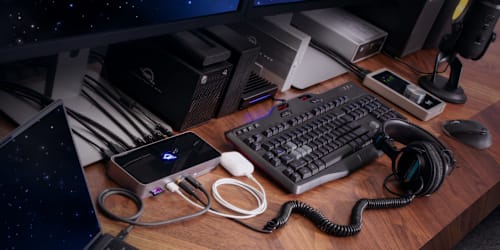
    OWC 11-Port Thunderbolt Dock on Desktop

    The Connect-It-All Solution

    The latest Thunderbolt interface uses a universal USB-C connector to transfer data, output video, and charge devices through the same cable. The OWC 11-Port Thunderbolt Dock’s Thunderbolt ports use that same USB-C connector to create a multi-connectivity solution for millions of existing and future Thunderbolt and USB-C computers and devices. Plus, the ports are fully USB4 future compatible.
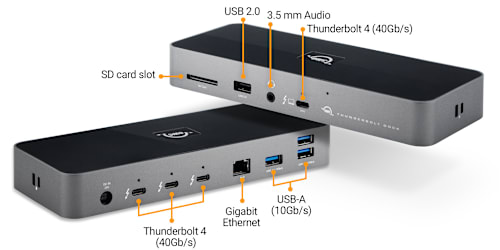
    OWC 11-Port Thunderbolt Dock Interfaces

    Connectivity and Convenience

    Massively expand the Thunderbolt functionality of your Apple silicon M1 or M2 Mac, any Apple 'Intel' Mac with Thunderbolt 3, or any Thunderbolt 4 PC.1 You can also use the OWC 11-Port Thunderbolt Dock with non-Thunderbolt USB-C machines like Chromebooks and iPads too. Gain convenient access to portable gear, headphones, and SD cards. Add your favorite Thunderbolt and USB devices, Gigabit Ethernet, and an SD card reader to your workflow... all while keeping your space free of cable clutter.

    Plug It All In
    Your devices will deliver the same compatibility as when they're plugged directly into your computer.2

    Reliable Streaming + Sharing
    Great for IP-based workflows and secured network access.

    Reinvent the Chain
    Create multiple independent “tree branches” and connect multiple bus-powered devices.

    Speedy Content Transfers
    Import photos and video footage quickly via the SD card reader.

    Powerful
    96W of power to charge your laptop + power delivery to your connected devices.1

    Adjustable LED
    Customize the illumination for your work setting.

    More Ports = More Devices
    Connect more storage, up to two 4K displays or one 5K/6K/8K display, headphones and mics, accessories... you name it, you can use it.

    Securable
    Features both a Kensington Security Slot and Nano Security Slot for anti-theft cabling.

    Thunderbolt Certified
    Built to be OWC reliable, compatible with Mac and Windows.

    Cable Included
    0.8M Thunderbolt cable. It’s in the box.
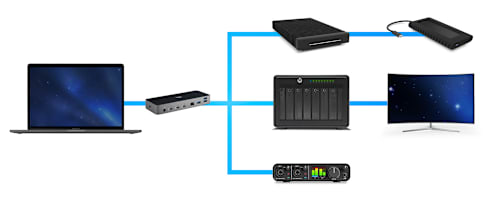
    OWC 11-Port Thunderbolt Dock Daisy Chain

    Reimagining the Daisy Chain

    Daisy chains are perfect for connecting a lot of devices to a single port, but remove any device other than the last one and you're left with the hassle of disconnecting and reconnecting devices. The OWC 11-Port Thunderbolt Dock lets you create three separate “tree branch” device chains, so you can remove devices from one chain without affecting or disconnecting the others. You can even add three Thunderbolt bus-powered devices.

    Plug In Multiple Bus-Powered Thunderbolt Drives

    In the past, daisy chaining external Thunderbolt storage required you to place it close to the front of the chain to get fast and reliable performance. That wasn’t possible with bus-powered drives. They had to be placed last in the Thunderbolt chain as the chain was limited to just one bus-powered device. Now, you can connect multiple portable Thunderbolt drives and SSDs directly to the OWC 11-Port Thunderbolt Dock to experience the fastest speed your storage device can deliver!
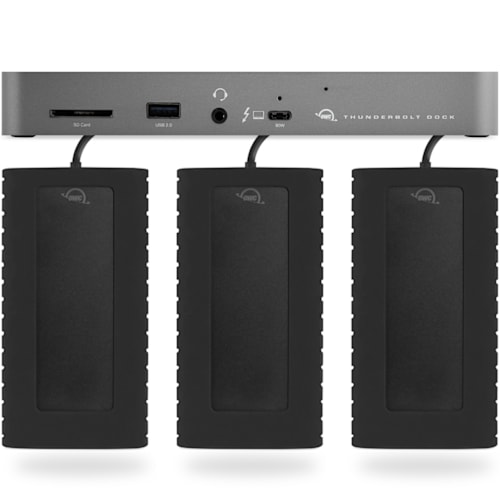
    OWC 11-Port Thunderbolt Dock + OWC Envoy Pro EX External Thunderbolt Drives OWC 11-Port Thunderbolt Dock SD Card Reader

    SD Card Reader

    Getting content to your computer is a necessity now that photo and video creation have become a part of daily life. Don’t waste time struggling with data transport. Transfer your creative files quickly, easily, and conveniently with the OWC 11-Port Thunderbolt Dock’s SD card reader. You can also use the reader like an external drive to store or backup files at will with 312MB/s of speed at your fingertips.

    OWC 11-Port Thunderbolt Dock Gigabit Ethernet Port

    Get Wired

    Nothing can put you behind schedule like slow, low-quality Wi-Fi. Don’t settle for a sub-par connection. Plug your wired network into the OWC 11-Port Thunderbolt Dock’s Gigabit Ethernet port for uninterrupted downloads, fast and reliable file transfers, secure network access, and increased productivity. The OWC 11-Port Thunderbolt Dock’s IP-based connection facilitates collaboration on big team projects without worrying about your Wi-Fi connection.

    OWC 11-Port Thunderbolt Dock with Multiple Displays

    A Higher Vision

    The OWC 11-Port Thunderbolt Dock’s technology empowers you to connect a single 5K/6K/8K display or up to two 4K displays. Enjoy more precise and vivid details in graphic-intensive CAD drawings. Attend a video meeting on one screen while editing content on another. Take your Adobe Photoshop or Affinity Photo images up a notch. Edit large format video on one display, while previewing the raw playback on the other. Whatever your workstation display needs, the OWC 11-Port Thunderbolt Dock gives you the vision to take it to the next level.4

    A Resolutionary Idea
    Whether your computer or tablet is sporting the latest technology or is a few years loved, the OWC 11-Port Thunderbolt Dock gives you multiple options to expand your visual horizons:

    Single and Dual Display Support

    4K @ 30Hz 4K @ 60Hz Dual 4K @ 60Hz 5K @ 60Hz
    (Apple Studio Display or LG Ultrafine 5K)
    Dual 5K @ 60Hz
    (Apple Studio Display)
    6K @ 60Hz
    (Apple Pro XDR)
    Dual 6K @ 60Hz
    Apple Pro XDR
    8K @ 60Hz
    Apple silicon Mac (M1, M2)3
    Apple silicon Mac (M1 Pro, M1 Max, M1 Ultra, M2 Pro, M2 Max)3
    Intel Mac with Thunderbolt 33

    1

    2

    iPad Pro or iPad Air with Thunderbolt4
    iPad Pro with USB-C4
    iPad Air with USB-C4
    Chromebook
    Windows PC with Thunderbolt 4
    Windows PC with Thunderbolt 3 / USB45
    Windows PC with USB-C (10Gb/s with DisplayPort)
    Windows PC with USB-C (5Gb/s with DisplayPort)
    Windows Tablet
    1. See Apple Studio Display specs for detailed Mac model support.
    2. See Apple Pro Display XDR specs for detailed Mac model support.
    3. OWC highly recommends that you verify the display support for your specific Mac model:
      • Identify your MacBook Pro model
      • Identify your MacBook Air model
      • Identify your Mac mini model
      • Identify your iMac model
      • Identify your Mac Studio model
      • Identify your Mac Pro model
    4. OWC highly recommends that you verify the display support for your specific iPad model:
      • Identify your iPad model
    5. OWC recommends that you verify the display support for your PC's Thunderbolt port. Some refresh rates require DisplayPort 1.4 HBR3 and DSC 1.2 support from the display and the host. Not all Thunderbolt ports support DisplayPort 1.4 – some are limited to DisplayPort 1.2, which may reduce refresh rate or resolution support.
    Compatible with Mac

    Mac

    The OWC 11-Port Thunderbolt Dock works with any Mac with an available Thunderbolt 3 port running macOS 11.1 Big Sur. Need a Thunderbolt dock that works with older versions of macOS? Check out our selection of award-winning Thunderbolt 3 Docks.

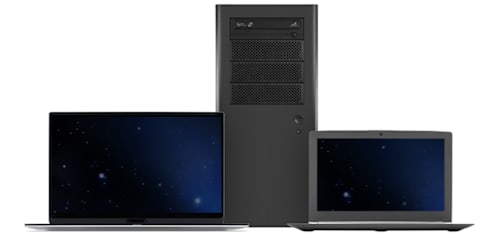
    Compatible with Windows PC

    Windows PC

    The OWC 11-Port Thunderbolt Dock works with any Windows PC with an available Thunderbolt 4 port. Need a dock for PC without Thunderbolt 4? Rest assured this connectivity wonder stands ready for duty as a USB-C dock. Check out all of our award-winning Thunderbolt and USB-C Docks.

    OWC 11-Port Thunderbolt Dock with 96W of charging power

    Powerful Freedom

    With 96 watts of charging power, you can do it all simultaneously: keep your notebook ready for mobile use, power/charge devices, and free up a Thunderbolt port on your machine. Ready to take a break or done for the day? The OWC 11-Port Thunderbolt Dock will continue to power and/or charge connected computers and devices.

    OWC Dock Ejector

    Disconnect in One Click

    Safely disconnect multiple drives in a single click. OWC Dock Ejector was designed by OWC hardware and software engineers to ensure all data is written before disconnection, saving time and protecting against data loss. It makes losing your hard-earned work a thing of the past.

    Apple SuperDrive Ready

    SuperDrive Ready

    OWC's free Dock Ejector software also includes a special driver that enables your OWC 11-Port Thunderbolt Dock to play and burn CDs and DVDs with the Apple SuperDrive. Just connect the SuperDrive to an open USB-A port on the OWC 11-Port Thunderbolt Dock for bus power to watch a DVD movie, listen to music CDs, create a backup disk, and install software.

    OWC Thunderbolt Cable

    OWC Thunderbolt Cable Included
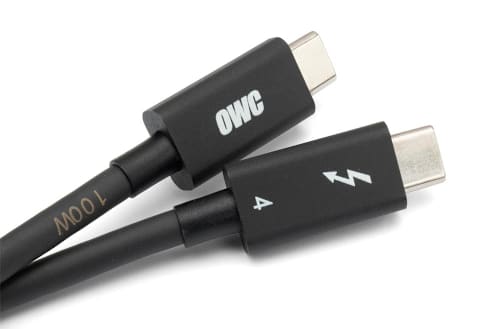
    OWC 11-Port Thunderbolt Dock comes with a certified 0.8M OWC Thunderbolt Cable. But if your workflow demands a different length to make the connection, OWC Thunderbolt (USB-C) Cables are the perfect choice.

    OWC ClingOn

    Work with Ultimate Confidence

    Active workspaces expose gear to unexpected bumps and shoves. OWC ClingOn custom cable stabilizers (sold separately) screw into the OWC Dock or OWC Drive housing to reduce – if not completely eliminate – cable strain on Thunderbolt and USB-C connections so you can work with ultimate confidence even in the highest foot traffic environments.

    OWC Innergize - Photographer on mountaintop

    Innergize Your Workflow with Highest Performance and Reliability

    OWC Innergize™ is the first stage of the Capture to Completion™ ecosystem of OWC products designed to seamlessly propel professional photographers, videographers, and content creators to the highest level of workflow performance and reliability. This OWC custom-designed app is a complete health, performance, and field upgrade management tool when using OWC Atlas memory cards with OWC Atlas readers and reader equipped products.

    Work with Maximum Confidence and Reliability

    OWC Innergize - Health

    Health
    Over time and use cycles, flash memory does wear out. Innergize verifies and reports the percentage of use life remaining. Now you can work with full confidence your OWC flash memory product will deliver the reliability you can trust.

    OWC Innergize - Sanitize

    Sanitize
    Writes, deletes, and formatting all take their toll on memory cards. Innergize cleans and restores the flash memory performance of OWC memory cards so you can get the best results on every use.

    OWC Innergize - Field Upgrade

    Field Upgrade

    When new cameras or firmware updates to existing cameras are introduced, they may not work properly with flash memory cards and drives. Innergize gives OWC memory card users the ability to quickly upgrade their firmware in the field for full compatibility, additional performance enhancements, and bug fixes for optimal reliability.

    1. Thunderbolt 4 host port provides up to 96W of power to the host computer. Thunderbolt 4 ports for device/drive connection provide up to 15W of power. USB ports provide up to 1.5A of power for bus-powered drives and device charging.
    2. Works with Thunderbolt 4, Thunderbolt 3, USB4, and USB host computers and mobile devices. Thunderbolt/Thunderbolt 2 Mac models are supported via USB-A host connection. Thunderbolt/Thunderbolt 2 host connection is not supported.
    3. Works with Thunderbolt (USB-C), Thunderbolt/Thunderbolt 2 (mDP), and USB devices. Thunderbolt/Thunderbolt 2 (mDP) device support requires a certified Thunderbolt 3 (USB-C) to Thunderbolt 2 (mDP) adapter and a Thunderbolt 2 cable (not included). This configuration provides data transfer at up to 20Gb/s but does not support notebook charging.
    4. Actual display support depends upon host. Please review the display specifications for your specific host system to determine the maximum supported resolution, refresh rate, color depth, and number of external displays over Thunderbolt or USB.
    • Collections
    • Dock

    Vendor: OWC OWC

    OWC 11-Port Thunderbolt Dock for Mac/PC with 96W PD and 3x Thunderbolt 4

    Sale price$199.99Regular price $229.99

    SKU OWCTB4DOCK

    Available to order — allow extra processing and shipping time

    Full manufacturer warranties on everything we sell
    14-day returns on new, unopened items
    Questions? Talk to a specialist — Mon–Fri 8:30–5 ET

    The Past, Present, and Future is Yours

    Three Thunderbolt ports and four USB ports empower you to connect to past, present and future devices. Up to two 4K displays or a 5K/6K/8K display, high-performance storage including NVMe SSDs, A/V mixers, phones, tablets, even desktop accessories like a keyboard or mouse. With the OWC 11-Port Thunderbolt Dock, an entire world of USB and Thunderbolt accessories is ready for you to connect and expand your capabilities.

    OWC 11-Port Thunderbolt Dock on Desktop

    The Connect-It-All Solution

    The latest Thunderbolt interface uses a universal USB-C connector to transfer data, output video, and charge devices through the same cable. The OWC 11-Port Thunderbolt Dock’s Thunderbolt ports use that same USB-C connector to create a multi-connectivity solution for millions of existing and future Thunderbolt and USB-C computers and devices. Plus, the ports are fully USB4 future compatible.

    OWC 11-Port Thunderbolt Dock Interfaces

    Connectivity and Convenience

    Massively expand the Thunderbolt functionality of your Apple silicon M1 or M2 Mac, any Apple 'Intel' Mac with Thunderbolt 3, or any Thunderbolt 4 PC.1 You can also use the OWC 11-Port Thunderbolt Dock with non-Thunderbolt USB-C machines like Chromebooks and iPads too. Gain convenient access to portable gear, headphones, and SD cards. Add your favorite Thunderbolt and USB devices, Gigabit Ethernet, and an SD card reader to your workflow... all while keeping your space free of cable clutter.

    Plug It All In
    Your devices will deliver the same compatibility as when they're plugged directly into your computer.2

    Reliable Streaming + Sharing
    Great for IP-based workflows and secured network access.

    Reinvent the Chain
    Create multiple independent “tree branches” and connect multiple bus-powered devices.

    Speedy Content Transfers
    Import photos and video footage quickly via the SD card reader.

    Powerful
    96W of power to charge your laptop + power delivery to your connected devices.1

    Adjustable LED
    Customize the illumination for your work setting.

    More Ports = More Devices
    Connect more storage, up to two 4K displays or one 5K/6K/8K display, headphones and mics, accessories... you name it, you can use it.

    Securable
    Features both a Kensington Security Slot and Nano Security Slot for anti-theft cabling.

    Thunderbolt Certified
    Built to be OWC reliable, compatible with Mac and Windows.

    Cable Included
    0.8M Thunderbolt cable. It’s in the box.

    OWC 11-Port Thunderbolt Dock Daisy Chain

    Reimagining the Daisy Chain

    Daisy chains are perfect for connecting a lot of devices to a single port, but remove any device other than the last one and you're left with the hassle of disconnecting and reconnecting devices. The OWC 11-Port Thunderbolt Dock lets you create three separate “tree branch” device chains, so you can remove devices from one chain without affecting or disconnecting the others. You can even add three Thunderbolt bus-powered devices.

    Plug In Multiple Bus-Powered Thunderbolt Drives

    In the past, daisy chaining external Thunderbolt storage required you to place it close to the front of the chain to get fast and reliable performance. That wasn’t possible with bus-powered drives. They had to be placed last in the Thunderbolt chain as the chain was limited to just one bus-powered device. Now, you can connect multiple portable Thunderbolt drives and SSDs directly to the OWC 11-Port Thunderbolt Dock to experience the fastest speed your storage device can deliver!
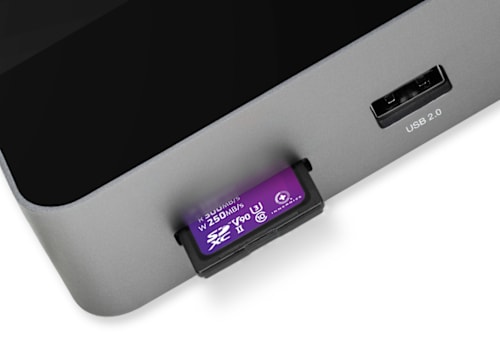
    OWC 11-Port Thunderbolt Dock + OWC Envoy Pro EX External Thunderbolt Drives OWC 11-Port Thunderbolt Dock SD Card Reader

    SD Card Reader

    Getting content to your computer is a necessity now that photo and video creation have become a part of daily life. Don’t waste time struggling with data transport. Transfer your creative files quickly, easily, and conveniently with the OWC 11-Port Thunderbolt Dock’s SD card reader. You can also use the reader like an external drive to store or backup files at will with 312MB/s of speed at your fingertips.
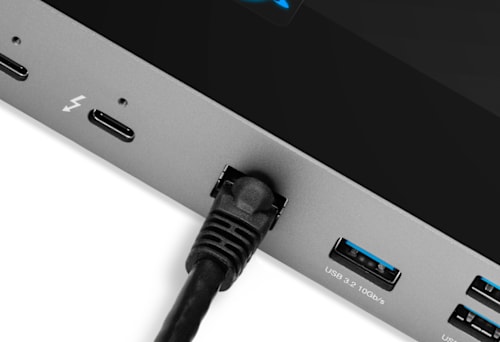
    OWC 11-Port Thunderbolt Dock Gigabit Ethernet Port

    Get Wired

    Nothing can put you behind schedule like slow, low-quality Wi-Fi. Don’t settle for a sub-par connection. Plug your wired network into the OWC 11-Port Thunderbolt Dock’s Gigabit Ethernet port for uninterrupted downloads, fast and reliable file transfers, secure network access, and increased productivity. The OWC 11-Port Thunderbolt Dock’s IP-based connection facilitates collaboration on big team projects without worrying about your Wi-Fi connection.
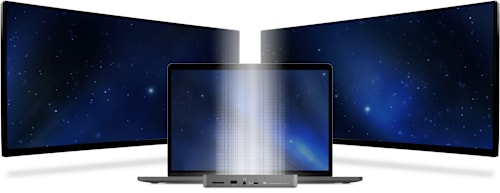
    OWC 11-Port Thunderbolt Dock with Multiple Displays

    A Higher Vision

    The OWC 11-Port Thunderbolt Dock’s technology empowers you to connect a single 5K/6K/8K display or up to two 4K displays. Enjoy more precise and vivid details in graphic-intensive CAD drawings. Attend a video meeting on one screen while editing content on another. Take your Adobe Photoshop or Affinity Photo images up a notch. Edit large format video on one display, while previewing the raw playback on the other. Whatever your workstation display needs, the OWC 11-Port Thunderbolt Dock gives you the vision to take it to the next level.4

    A Resolutionary Idea
    Whether your computer or tablet is sporting the latest technology or is a few years loved, the OWC 11-Port Thunderbolt Dock gives you multiple options to expand your visual horizons:

    Single and Dual Display Support

    4K @ 30Hz 4K @ 60Hz Dual 4K @ 60Hz 5K @ 60Hz
    (Apple Studio Display or LG Ultrafine 5K)
    Dual 5K @ 60Hz
    (Apple Studio Display)
    6K @ 60Hz
    (Apple Pro XDR)
    Dual 6K @ 60Hz
    Apple Pro XDR
    8K @ 60Hz
    Apple silicon Mac (M1, M2)3
    Apple silicon Mac (M1 Pro, M1 Max, M1 Ultra, M2 Pro, M2 Max)3
    Intel Mac with Thunderbolt 33

    1

    2

    iPad Pro or iPad Air with Thunderbolt4
    iPad Pro with USB-C4
    iPad Air with USB-C4
    Chromebook
    Windows PC with Thunderbolt 4
    Windows PC with Thunderbolt 3 / USB45
    Windows PC with USB-C (10Gb/s with DisplayPort)
    Windows PC with USB-C (5Gb/s with DisplayPort)
    Windows Tablet
    1. See Apple Studio Display specs for detailed Mac model support.
    2. See Apple Pro Display XDR specs for detailed Mac model support.
    3. OWC highly recommends that you verify the display support for your specific Mac model:
      • Identify your MacBook Pro model
      • Identify your MacBook Air model
      • Identify your Mac mini model
      • Identify your iMac model
      • Identify your Mac Studio model
      • Identify your Mac Pro model
    4. OWC highly recommends that you verify the display support for your specific iPad model:
      • Identify your iPad model
    5. OWC recommends that you verify the display support for your PC's Thunderbolt port. Some refresh rates require DisplayPort 1.4 HBR3 and DSC 1.2 support from the display and the host. Not all Thunderbolt ports support DisplayPort 1.4 – some are limited to DisplayPort 1.2, which may reduce refresh rate or resolution support.
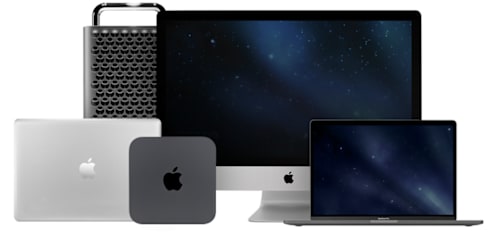
    Compatible with Mac

    Mac

    The OWC 11-Port Thunderbolt Dock works with any Mac with an available Thunderbolt 3 port running macOS 11.1 Big Sur. Need a Thunderbolt dock that works with older versions of macOS? Check out our selection of award-winning Thunderbolt 3 Docks.
    Compatible with Windows PC

    Windows PC

    The OWC 11-Port Thunderbolt Dock works with any Windows PC with an available Thunderbolt 4 port. Need a dock for PC without Thunderbolt 4? Rest assured this connectivity wonder stands ready for duty as a USB-C dock. Check out all of our award-winning Thunderbolt and USB-C Docks.
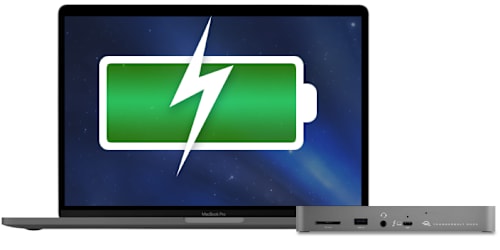
    OWC 11-Port Thunderbolt Dock with 96W of charging power

    Powerful Freedom

    With 96 watts of charging power, you can do it all simultaneously: keep your notebook ready for mobile use, power/charge devices, and free up a Thunderbolt port on your machine. Ready to take a break or done for the day? The OWC 11-Port Thunderbolt Dock will continue to power and/or charge connected computers and devices.

    OWC Dock Ejector

    Disconnect in One Click

    Safely disconnect multiple drives in a single click. OWC Dock Ejector was designed by OWC hardware and software engineers to ensure all data is written before disconnection, saving time and protecting against data loss. It makes losing your hard-earned work a thing of the past.
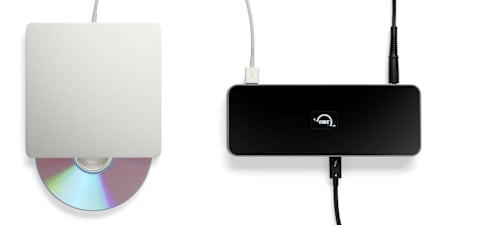
    Apple SuperDrive Ready

    SuperDrive Ready

    OWC's free Dock Ejector software also includes a special driver that enables your OWC 11-Port Thunderbolt Dock to play and burn CDs and DVDs with the Apple SuperDrive. Just connect the SuperDrive to an open USB-A port on the OWC 11-Port Thunderbolt Dock for bus power to watch a DVD movie, listen to music CDs, create a backup disk, and install software.
    OWC Thunderbolt Cable

    OWC Thunderbolt Cable Included
    OWC 11-Port Thunderbolt Dock comes with a certified 0.8M OWC Thunderbolt Cable. But if your workflow demands a different length to make the connection, OWC Thunderbolt (USB-C) Cables are the perfect choice.
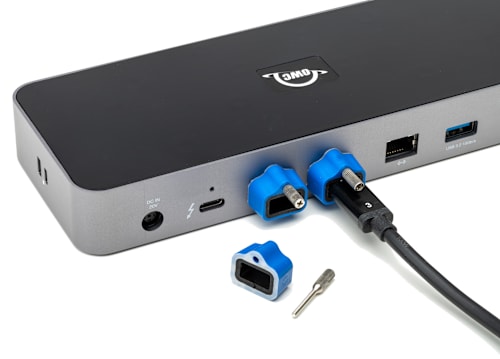
    OWC ClingOn

    Work with Ultimate Confidence

    Active workspaces expose gear to unexpected bumps and shoves. OWC ClingOn custom cable stabilizers (sold separately) screw into the OWC Dock or OWC Drive housing to reduce – if not completely eliminate – cable strain on Thunderbolt and USB-C connections so you can work with ultimate confidence even in the highest foot traffic environments.

    OWC Innergize - Photographer on mountaintop

    Innergize Your Workflow with Highest Performance and Reliability

    OWC Innergize™ is the first stage of the Capture to Completion™ ecosystem of OWC products designed to seamlessly propel professional photographers, videographers, and content creators to the highest level of workflow performance and reliability. This OWC custom-designed app is a complete health, performance, and field upgrade management tool when using OWC Atlas memory cards with OWC Atlas readers and reader equipped products.

    Work with Maximum Confidence and Reliability

    OWC Innergize - Health

    Health
    Over time and use cycles, flash memory does wear out. Innergize verifies and reports the percentage of use life remaining. Now you can work with full confidence your OWC flash memory product will deliver the reliability you can trust.
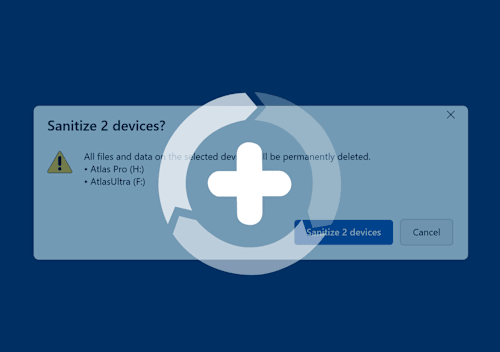
    OWC Innergize - Sanitize

    Sanitize
    Writes, deletes, and formatting all take their toll on memory cards. Innergize cleans and restores the flash memory performance of OWC memory cards so you can get the best results on every use.
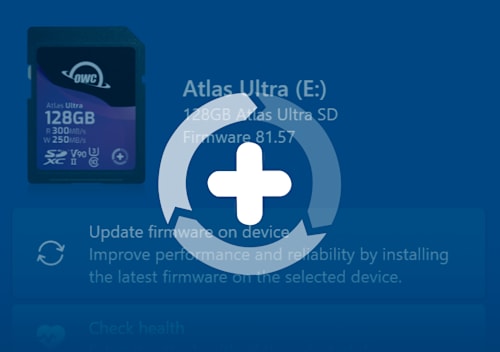
    OWC Innergize - Field Upgrade

    Field Upgrade

    When new cameras or firmware updates to existing cameras are introduced, they may not work properly with flash memory cards and drives. Innergize gives OWC memory card users the ability to quickly upgrade their firmware in the field for full compatibility, additional performance enhancements, and bug fixes for optimal reliability.

    1. Thunderbolt 4 host port provides up to 96W of power to the host computer. Thunderbolt 4 ports for device/drive connection provide up to 15W of power. USB ports provide up to 1.5A of power for bus-powered drives and device charging.
    2. Works with Thunderbolt 4, Thunderbolt 3, USB4, and USB host computers and mobile devices. Thunderbolt/Thunderbolt 2 Mac models are supported via USB-A host connection. Thunderbolt/Thunderbolt 2 host connection is not supported.
    3. Works with Thunderbolt (USB-C), Thunderbolt/Thunderbolt 2 (mDP), and USB devices. Thunderbolt/Thunderbolt 2 (mDP) device support requires a certified Thunderbolt 3 (USB-C) to Thunderbolt 2 (mDP) adapter and a Thunderbolt 2 cable (not included). This configuration provides data transfer at up to 20Gb/s but does not support notebook charging.
    4. Actual display support depends upon host. Please review the display specifications for your specific host system to determine the maximum supported resolution, refresh rate, color depth, and number of external displays over Thunderbolt or USB.

    Pairs well with

    OWC 11-Port Thunderbolt Dock for Mac/PC with 96W PD and 3x Thunderbolt 4

    OWC 11-Port Thunderbolt Dock for Mac/PC with 96W PD and 3x Thunderbolt 4

    Sale price$199.99Regular price $229.99
    CineBits internal — do not follow

    Downloads

    • Manual Support Manual for OWC 11-Port Thunderbolt 4 Dock

    We know the gear

    Two decades each on set and in the field — real workflow expertise, not a call center.

    Fast, free shipping

    Free U.S. shipping on most orders over $500. In-stock orders ship same day.

    Real human support

    Talk to specialists who actually use this equipment — before and after you buy.

    Secure checkout

    Your payment and personal data are protected on every order.

    CineBitsCineBits full lockup, white ink with gold tagline, transparent

    CineBits is your destination for professional AV/Cinema gear. We come from decades on set — developing workflows and battle-testing equipment — so you walk away with the right gear and the knowledge to master your craft.

    Help
    • Contact Us
    • Financing
    • Upgrade Innovations Assembly Instructions
    • Shipping & Delivery
    • Returns & Refunds
    • Terms of Service
    Industries
    • Production
    • Houses of Worship
    • Education
    • Government & Military
    • Commercial & Sports
    • Storage Rentals
    Contact
    • 866-CINE-BIT
    • info@cinebits.co
    • Mon–Fri 8:30am–5pm Eastern
    • Same Day Shipping Cutoff 1pm

    News, guides & deals delivered to your e-mail:

    • Facebook
    • Instagram
    • LinkedIn
    © 2026 CineBits LLC. 
    • Choosing a selection results in a full page refresh.
    • Opens in a new window.