Skip to content
  • Facebook
  • Instagram
  • LinkedIn

Free shipping over $500!

Free U.S. shipping on most orders over $500!

$25 off $500+ · LAUNCH25

Launch offer: $25 off $500+ with LAUNCH25 · $50 off $1,000+ with LAUNCH50

$50 off $1,000+ · LAUNCH50

Bigger builds: $125 off $2,500+ with LAUNCH125 · $250 off $5,000+ with LAUNCH250

$125 off $2,500+ · LAUNCH125

Don't see it on the site? We can get it — e-mail us for a quote on the gear you need!

$250 off $5,000+ · LAUNCH250

Competitive pricing with a focus on service and knowledge.

  • All Products
  • Shop by Category
  • Shop by Brand
Login
  • Facebook
  • Instagram
  • LinkedIn
Search
CineBitsCineBits full lockup, white ink with gold tagline, transparentCineBits full lockup, white ink with gold tagline, transparentCineBits full lockup, white ink with gold tagline, transparentCineBits full lockup, white ink with gold tagline, transparent
  • All ProductsAll Products
  • Shop by CategoryShop by Category
      • Rigging
      • Monitors
      • Video
      • Audio
      • Storage
      • Cables
      • Power
      • Lenses
      • Cameras
      • Transport
      • Lighting
  • Shop by BrandShop by Brand
Search Login Cart 0
Cart

Your cart is currently empty.

  • Continue shopping
Spend $500.00 more to reach free shipping!
    Order special instructions
    Estimate shipping
    Discount
      Taxes and shipping calculated at checkout
      Subtotal
      $0.00 USD
      View cart
      Recently viewed
      Search

      We use cookies

      This site uses cookies for better user experience and analytics. View our privacy policy for more info.

      OWC USB-C Dual HDMI 4K Display Adapter with DisplayLink
      OWC USB-C Dual HDMI 4K Display Adapter with DisplayLink
      OWC USB-C Dual HDMI 4K Display Adapter with DisplayLink
      OWC USB-C Dual HDMI 4K Display Adapter with DisplayLink
      OWC USB-C Dual HDMI 4K Display Adapter with DisplayLink
      OWC USB-C Dual HDMI 4K Display Adapter with DisplayLink

      Oh and BTW… it works with USB-C and Thunderbolt Macs & PCs too 😉

      When the first generation of Apple silicon Macs were introduced, we immediately fell in love with the M1's ability to rival – and even go faster and run cooler than - higher-end, more expensive machines. The launch of the M2 and M3 with their performance and power efficiency improvements made us as giddy as any geek unboxing a new gadget. However, our excitement and praise about Apple's latest innovation once again waned considerably when we discovered the base M3 model (meaning not M3 Pro or M3 Max) shares the same single external display limitation as the previous M1 and M2.

      Say hello to the OWC USB-C Dual HDMI® 4K Adapter. It’s the DisplayLink powered solution for expanding your M1, M2, M3, M4, and M5 machine’s digital window for easier video editing, seeing more of your workflow simultaneously, or even creating eye-catching digital signage. For the ultimate in convenience, we gave this compact, bus-powered adapter a USB-C power pass-through port so you can charge/power your laptop.2 Being the leading dock innovator for Macs, we know you love having ports freed up on your machine!
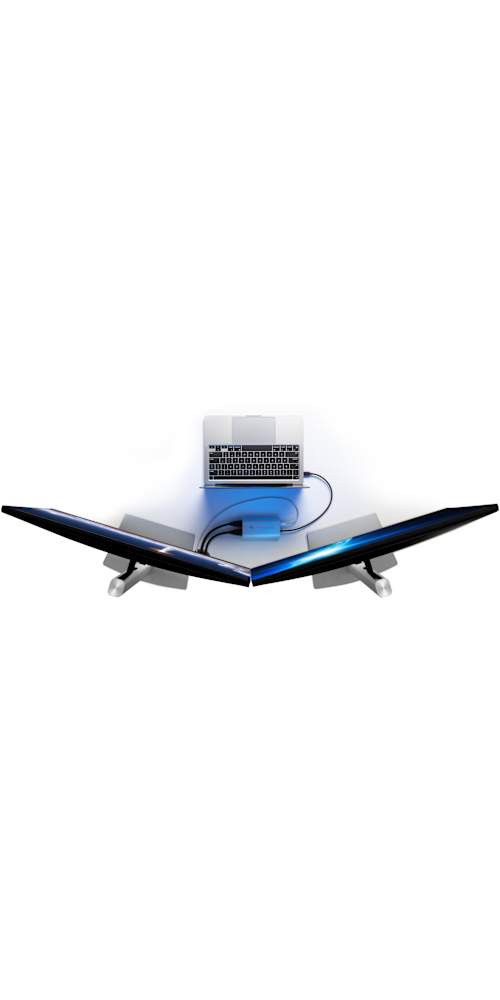
      Top-down view of MacBook Pro with OWC USB-C Dual HDMI® 4K Display Adapter and two displays

      Wondrous Dual-Displays for All

      Besides creating delightful dual-display nirvana with Apple M1, M2, M3, M4, and M5 Apple silicon Macs, you can easily use this nifty, pixel multiplying adapter with your USB-C or Thunderbolt equipped Mac or PC. Just connect the built-in USB-C cable to your machine, download the DisplayLink Manager application (Mac) or driver (Windows), and bam, dual 4K "Plug and Display" magnificence is yours to revel in.
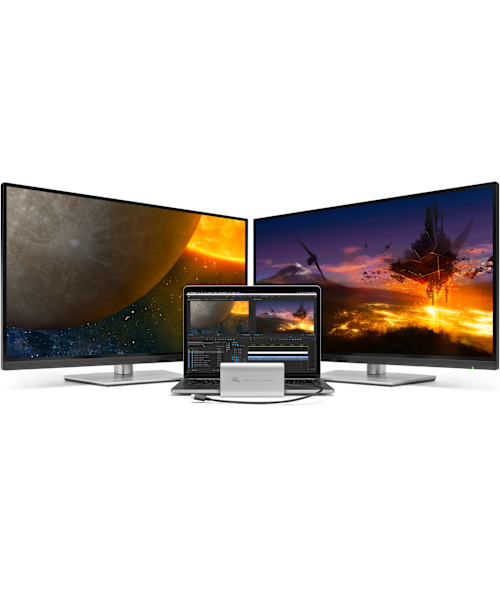
      MacBook Pro with OWC USB-C Dual HDMI® 4K Display Adapter and two displays

      Display-It-All + Power-It-Up

      With its compact travel-friendly size and bus-powered convenience, you’ll always be ready to wow an audience or a team with your newfound multi-display capability. No longer will you have to choose between power and dual displays, or take up a second USB-C port to charge your laptop — this handy little adapter features a power pass-through port. Simply plug in your laptop’s USB-C power adapter to keep the electrons flowing.2
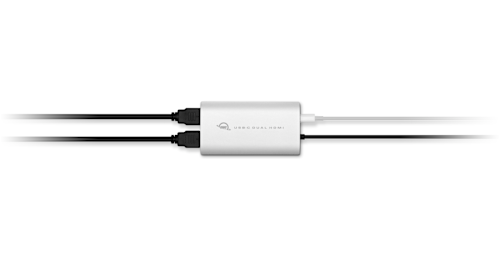
      OWC USB-C Dual HDMI® 4K Display Adapter with two HDMI cables connected

      USB-C
      Thunderbolt 3
      Thunderbolt 4 / USB4
      M1 + M2 + M3 + M4 + M5 + Intel + Mac + PC

      Universal compatibility means one great glorious thing — if your port matches the plug, you’re all set. You don’t have to fiddle around to see if you have the right interface, the correct port, or the correct cable.

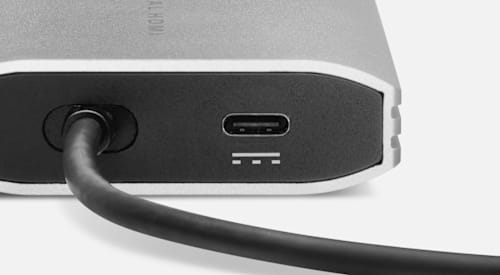
      OWC USB-C Dual HDMI® 4K Display Adapter rear detail

      Charging convenience is yours with the USB-C power pass-through port. Simultaneously charge your Mac or PC laptop while driving dual displays.2
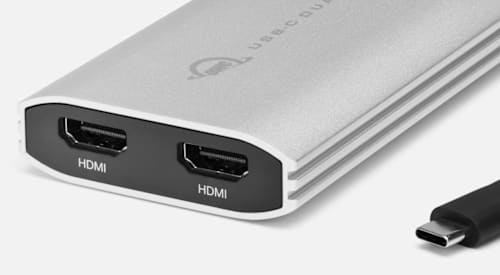
      OWC USB-C Dual HDMI® 4K Display Adapter front detail

      Connect up to two 4K displays via a single Thunderbolt or USB-C port on any Mac or Windows PC computer, or add a second adapter for up to four displays, and launch your display capability into the stratosphere.1

      Image showing travel scene

      Planetary Exploration Encouraged

      Take dual-display capability wherever you may roam, be it on the other side of the world, living the BYOD (Bring Your Own Device) life with clients, or nestled into your creative workspace dreaming up your next. About the size and weight of a compact smartphone, the OWC USB-C Dual HDMI® 4K Display Adapter hides away in bags, pockets, and camera packs, and tucks neatly out-of-sight at your workstation. Wherever your adventures take you, plugging dual displays into your Mac or PC doesn’t get any easier.

      Professional users working as a team

      Pro Maestros

      For pros, it’s all about the workflows to gain that competitive advantage. When you become a pixel-pushing dual-display maestro, everything just gets more efficient. From working all-at-once in multiple programs like Photoshop, Final Cut, DaVinci Resolve, Logic Pro, Sketch, and Affinity Photo, to viewing all your Internet “research” – Calvin and Hobbes micro-breaks are part of well-balanced workflow, right? – you’ll be project-hopping, app-swapping, and producing with greater ease than any single-display workflow can achieve.

      And when it comes time to share all your awesomeness, what better way to collab with your team than having a vast digital window to showcase it all? You'll have room-a-plenty to riff ideas, travel multiple paths, and expand on your concepts with ease.

      Influencer shooting video

      Influencers
      Expand your followers with more digital space to edit, find, and respond to content, comments, mega fans, and if you must… trolls. Not the ones that live under bridges and in caves, the much-much worse online variety. 😀

      Keep tabs on ever-important social media vitals to keep the posts, reposts, views, and likes flowing. All that extra display space expands a new world of content creation workflows so nothing will hold you back from enrapturing your audience with stunning videos, photos, and content. After all, when you’re living the social life, you deserve the display capability to match.

      Woman in front of video screen

      Next-Level Learning

      You may be light on desk space, but you don’t need to be short on pixels. Go next-level on learning with expansive digital real estate to dive so deep into lessons that you’ll need to wear flippers. Take detailed notes which no ink and paper could keep up. Immerse yourself in the details and subtleties of videos and imagery only large displays provide. And make all the pirates jealous with your treasure trove of research docs.
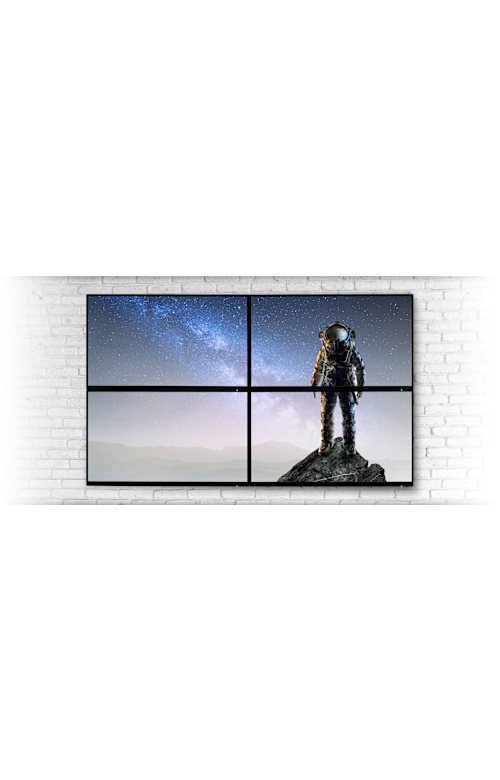
      Four displays showing space scene

      4… 3… 2… 1…

      Launch your digital display capability into the stratosphere. Analyze multiple data sets for intensive research projects. Create a lasting impact with digital display signage at an event, in your store, or restaurant. Or give a dull lobby a punch of pixels with a welcoming digital showcase of your company’s accomplishments. It’s easy to enhance your digital window to the world by utilizing a single OWC USB-C Dual HDMI® 4K Display Adapter for a dual display experience. Or connect an additional OWC USB-C Dual HDMI® 4K Display Adapter to your Mac or PC to really push the pixels with up to four displays on Mac or up to six displays on Windows PC.1

      Editors working in video studio

      Suddenly… You Have More Time

      Take advantage of expansive dual-display capability to realize productivity gains up to 35%.3 With all that extra time, you could take your kids to that new neighborhood park they’ve been begging you for the last few weeks. Take the dog for a well-deserved frolic on the town. Or sit down to enjoy the mental benefits of mindful meditation listening to your favorite tunes.

      Or heck, take all that extra time from utilizing dual displays to explore your design more, push the envelope on your photography, hone your storytelling, connect-the-dots with your mad number crunching capabilities, or run more security ops. After all, it’s up to you on how you’ll take advantage of all that newfound time. We’d vote for a balance of both fun and work — but mostly fun.

      Video editor working on dual displays

      Less Errors + A Happier You

      Go beyond improving productivity with a dual display workflow. Multiple research studies4 have found you can reduce errors by 20% and experience a 91% increase in your job satisfaction.3 Less errors. Less revisions. Faster turnaround times. Happier clients. Happier you. Imagine that. 😀
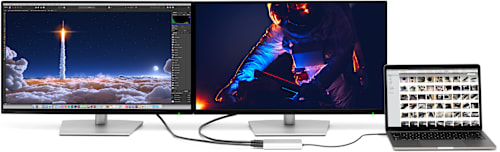

      MacBook Pro running dual displays via OWC USB-C Dual HDMI® 4K Display Adapter DisplayLink 4K Plug and Display badge

      DisplayLink “Plug and Display”
      Add displays to your Mac and PC with ease. Use any existing display, connect it to your adapter, install DisplayLink software, and plug it into any USB port.

      1. M1/M2 MacBook Air and M1/M3 iMac can support up to three external displays. M1/M2 Mac mini can support up to five external displays. M1/M2/M3 MacBook Pro and M4 iMac can support up to six external displays. M4/M4 Pro Mac mini can support up to seven external displays. M1/M2 Mac Studio and M2 Ultra Mac Pro can support up to ten external displays. Intel based Macs can support up to four external displays. Windows PCs can support up to six external displays.
      2. Total power delivery dependent on capability of attached USB-C power adapter.
      3. 2017 Fujitsu Siemens Computers “Office 21” research results of users going from two displays to three displays.
      4. Studies by the University of Utah and Wichita State University found dual displays reduce errors by 20%, increase job satisfaction 91%, and make work less stressful.
      • Collections
      • Adapters

      Vendor: OWC OWC

      OWC USB-C Dual HDMI 4K Display Adapter with DisplayLink

      $129.99

      SKU OWCCADPDL2HDMI

      Available to order — allow extra processing and shipping time

      Full manufacturer warranties on everything we sell
      14-day returns on new, unopened items
      Questions? Talk to a specialist — Mon–Fri 8:30–5 ET

      Oh and BTW… it works with USB-C and Thunderbolt Macs & PCs too 😉

      When the first generation of Apple silicon Macs were introduced, we immediately fell in love with the M1's ability to rival – and even go faster and run cooler than - higher-end, more expensive machines. The launch of the M2 and M3 with their performance and power efficiency improvements made us as giddy as any geek unboxing a new gadget. However, our excitement and praise about Apple's latest innovation once again waned considerably when we discovered the base M3 model (meaning not M3 Pro or M3 Max) shares the same single external display limitation as the previous M1 and M2.

      Say hello to the OWC USB-C Dual HDMI® 4K Adapter. It’s the DisplayLink powered solution for expanding your M1, M2, M3, M4, and M5 machine’s digital window for easier video editing, seeing more of your workflow simultaneously, or even creating eye-catching digital signage. For the ultimate in convenience, we gave this compact, bus-powered adapter a USB-C power pass-through port so you can charge/power your laptop.2 Being the leading dock innovator for Macs, we know you love having ports freed up on your machine!

      Top-down view of MacBook Pro with OWC USB-C Dual HDMI® 4K Display Adapter and two displays

      Wondrous Dual-Displays for All

      Besides creating delightful dual-display nirvana with Apple M1, M2, M3, M4, and M5 Apple silicon Macs, you can easily use this nifty, pixel multiplying adapter with your USB-C or Thunderbolt equipped Mac or PC. Just connect the built-in USB-C cable to your machine, download the DisplayLink Manager application (Mac) or driver (Windows), and bam, dual 4K "Plug and Display" magnificence is yours to revel in.

      MacBook Pro with OWC USB-C Dual HDMI® 4K Display Adapter and two displays

      Display-It-All + Power-It-Up

      With its compact travel-friendly size and bus-powered convenience, you’ll always be ready to wow an audience or a team with your newfound multi-display capability. No longer will you have to choose between power and dual displays, or take up a second USB-C port to charge your laptop — this handy little adapter features a power pass-through port. Simply plug in your laptop’s USB-C power adapter to keep the electrons flowing.2

      OWC USB-C Dual HDMI® 4K Display Adapter with two HDMI cables connected

      USB-C
      Thunderbolt 3
      Thunderbolt 4 / USB4
      M1 + M2 + M3 + M4 + M5 + Intel + Mac + PC

      Universal compatibility means one great glorious thing — if your port matches the plug, you’re all set. You don’t have to fiddle around to see if you have the right interface, the correct port, or the correct cable.

      OWC USB-C Dual HDMI® 4K Display Adapter rear detail

      Charging convenience is yours with the USB-C power pass-through port. Simultaneously charge your Mac or PC laptop while driving dual displays.2

      OWC USB-C Dual HDMI® 4K Display Adapter front detail

      Connect up to two 4K displays via a single Thunderbolt or USB-C port on any Mac or Windows PC computer, or add a second adapter for up to four displays, and launch your display capability into the stratosphere.1

      Image showing travel scene

      Planetary Exploration Encouraged

      Take dual-display capability wherever you may roam, be it on the other side of the world, living the BYOD (Bring Your Own Device) life with clients, or nestled into your creative workspace dreaming up your next. About the size and weight of a compact smartphone, the OWC USB-C Dual HDMI® 4K Display Adapter hides away in bags, pockets, and camera packs, and tucks neatly out-of-sight at your workstation. Wherever your adventures take you, plugging dual displays into your Mac or PC doesn’t get any easier.

      Professional users working as a team

      Pro Maestros

      For pros, it’s all about the workflows to gain that competitive advantage. When you become a pixel-pushing dual-display maestro, everything just gets more efficient. From working all-at-once in multiple programs like Photoshop, Final Cut, DaVinci Resolve, Logic Pro, Sketch, and Affinity Photo, to viewing all your Internet “research” – Calvin and Hobbes micro-breaks are part of well-balanced workflow, right? – you’ll be project-hopping, app-swapping, and producing with greater ease than any single-display workflow can achieve.

      And when it comes time to share all your awesomeness, what better way to collab with your team than having a vast digital window to showcase it all? You'll have room-a-plenty to riff ideas, travel multiple paths, and expand on your concepts with ease.

      Influencer shooting video

      Influencers
      Expand your followers with more digital space to edit, find, and respond to content, comments, mega fans, and if you must… trolls. Not the ones that live under bridges and in caves, the much-much worse online variety. 😀

      Keep tabs on ever-important social media vitals to keep the posts, reposts, views, and likes flowing. All that extra display space expands a new world of content creation workflows so nothing will hold you back from enrapturing your audience with stunning videos, photos, and content. After all, when you’re living the social life, you deserve the display capability to match.

      Woman in front of video screen

      Next-Level Learning

      You may be light on desk space, but you don’t need to be short on pixels. Go next-level on learning with expansive digital real estate to dive so deep into lessons that you’ll need to wear flippers. Take detailed notes which no ink and paper could keep up. Immerse yourself in the details and subtleties of videos and imagery only large displays provide. And make all the pirates jealous with your treasure trove of research docs.

      Four displays showing space scene

      4… 3… 2… 1…

      Launch your digital display capability into the stratosphere. Analyze multiple data sets for intensive research projects. Create a lasting impact with digital display signage at an event, in your store, or restaurant. Or give a dull lobby a punch of pixels with a welcoming digital showcase of your company’s accomplishments. It’s easy to enhance your digital window to the world by utilizing a single OWC USB-C Dual HDMI® 4K Display Adapter for a dual display experience. Or connect an additional OWC USB-C Dual HDMI® 4K Display Adapter to your Mac or PC to really push the pixels with up to four displays on Mac or up to six displays on Windows PC.1

      Editors working in video studio

      Suddenly… You Have More Time

      Take advantage of expansive dual-display capability to realize productivity gains up to 35%.3 With all that extra time, you could take your kids to that new neighborhood park they’ve been begging you for the last few weeks. Take the dog for a well-deserved frolic on the town. Or sit down to enjoy the mental benefits of mindful meditation listening to your favorite tunes.

      Or heck, take all that extra time from utilizing dual displays to explore your design more, push the envelope on your photography, hone your storytelling, connect-the-dots with your mad number crunching capabilities, or run more security ops. After all, it’s up to you on how you’ll take advantage of all that newfound time. We’d vote for a balance of both fun and work — but mostly fun.

      Video editor working on dual displays

      Less Errors + A Happier You

      Go beyond improving productivity with a dual display workflow. Multiple research studies4 have found you can reduce errors by 20% and experience a 91% increase in your job satisfaction.3 Less errors. Less revisions. Faster turnaround times. Happier clients. Happier you. Imagine that. 😀

      MacBook Pro running dual displays via OWC USB-C Dual HDMI® 4K Display Adapter DisplayLink 4K Plug and Display badge

      DisplayLink “Plug and Display”
      Add displays to your Mac and PC with ease. Use any existing display, connect it to your adapter, install DisplayLink software, and plug it into any USB port.

      1. M1/M2 MacBook Air and M1/M3 iMac can support up to three external displays. M1/M2 Mac mini can support up to five external displays. M1/M2/M3 MacBook Pro and M4 iMac can support up to six external displays. M4/M4 Pro Mac mini can support up to seven external displays. M1/M2 Mac Studio and M2 Ultra Mac Pro can support up to ten external displays. Intel based Macs can support up to four external displays. Windows PCs can support up to six external displays.
      2. Total power delivery dependent on capability of attached USB-C power adapter.
      3. 2017 Fujitsu Siemens Computers “Office 21” research results of users going from two displays to three displays.
      4. Studies by the University of Utah and Wichita State University found dual displays reduce errors by 20%, increase job satisfaction 91%, and make work less stressful.

      Pairs well with

      OWC USB-C Dual HDMI 4K Display Adapter with DisplayLink

      OWC USB-C Dual HDMI 4K Display Adapter with DisplayLink

      $129.99
      CineBits internal — do not follow

      Downloads

      • Manual Support Manual for OWC USB-C Dual HDMI 4K Display Adapter

      We know the gear

      Two decades each on set and in the field — real workflow expertise, not a call center.

      Fast, free shipping

      Free U.S. shipping on most orders over $500. In-stock orders ship same day.

      Real human support

      Talk to specialists who actually use this equipment — before and after you buy.

      Secure checkout

      Your payment and personal data are protected on every order.

      CineBitsCineBits full lockup, white ink with gold tagline, transparent

      CineBits is your destination for professional AV/Cinema gear. We come from decades on set — developing workflows and battle-testing equipment — so you walk away with the right gear and the knowledge to master your craft.

      Help
      • Contact Us
      • Financing
      • Upgrade Innovations Assembly Instructions
      • Shipping & Delivery
      • Returns & Refunds
      • Terms of Service
      Industries
      • Production
      • Houses of Worship
      • Education
      • Government & Military
      • Commercial & Sports
      • Storage Rentals
      Contact
      • 866-CINE-BIT
      • info@cinebits.co
      • Mon–Fri 8:30am–5pm Eastern
      • Same Day Shipping Cutoff 1pm

      News, guides & deals delivered to your e-mail:

      • Facebook
      • Instagram
      • LinkedIn
      © 2026 CineBits LLC. 
      • Choosing a selection results in a full page refresh.
      • Opens in a new window.