








Skip to content
  • Facebook
  • Instagram
  • LinkedIn

Free shipping over $500!

Free U.S. shipping on most orders over $500!

$25 off $500+ · LAUNCH25

Launch offer: $25 off $500+ with LAUNCH25 · $50 off $1,000+ with LAUNCH50

$50 off $1,000+ · LAUNCH50

Bigger builds: $125 off $2,500+ with LAUNCH125 · $250 off $5,000+ with LAUNCH250

$125 off $2,500+ · LAUNCH125

Don't see it on the site? We can get it — e-mail us for a quote on the gear you need!

$250 off $5,000+ · LAUNCH250

Competitive pricing with a focus on service and knowledge.

  • All Products
  • Shop by Category
  • Shop by Brand
Login
  • Facebook
  • Instagram
  • LinkedIn
Search
CineBitsCineBits full lockup, white ink with gold tagline, transparentCineBits full lockup, white ink with gold tagline, transparentCineBits full lockup, white ink with gold tagline, transparentCineBits full lockup, white ink with gold tagline, transparent
  • All ProductsAll Products
  • Shop by CategoryShop by Category
      • Rigging
      • Monitors
      • Video
      • Audio
      • Storage
      • Cables
      • Power
      • Lenses
      • Cameras
      • Transport
      • Lighting
  • Shop by BrandShop by Brand
Search Login Cart 0
Cart

Your cart is currently empty.

  • Continue shopping
Spend $500.00 more to reach free shipping!
    Order special instructions
    Estimate shipping
    Discount
      Taxes and shipping calculated at checkout
      Subtotal
      $0.00 USD
      View cart
      Recently viewed
      Search

      We use cookies

      This site uses cookies for better user experience and analytics. View our privacy policy for more info.

      OWC Thunderbolt Go Dock 11-Port Solution w/ Built-in Power Supply
      OWC Thunderbolt Go Dock 11-Port Solution w/ Built-in Power Supply
      OWC Thunderbolt Go Dock 11-Port Solution w/ Built-in Power Supply
      OWC Thunderbolt Go Dock 11-Port Solution w/ Built-in Power Supply
      OWC Thunderbolt Go Dock 11-Port Solution w/ Built-in Power Supply
      OWC Thunderbolt Go Dock 11-Port Solution w/ Built-in Power Supply
      OWC Thunderbolt Go Dock 11-Port Solution w/ Built-in Power Supply

      Introducing OWC Thunderbolt Go DockOWC Thunderbolt Go Dock with other devices

      Go Connect It All

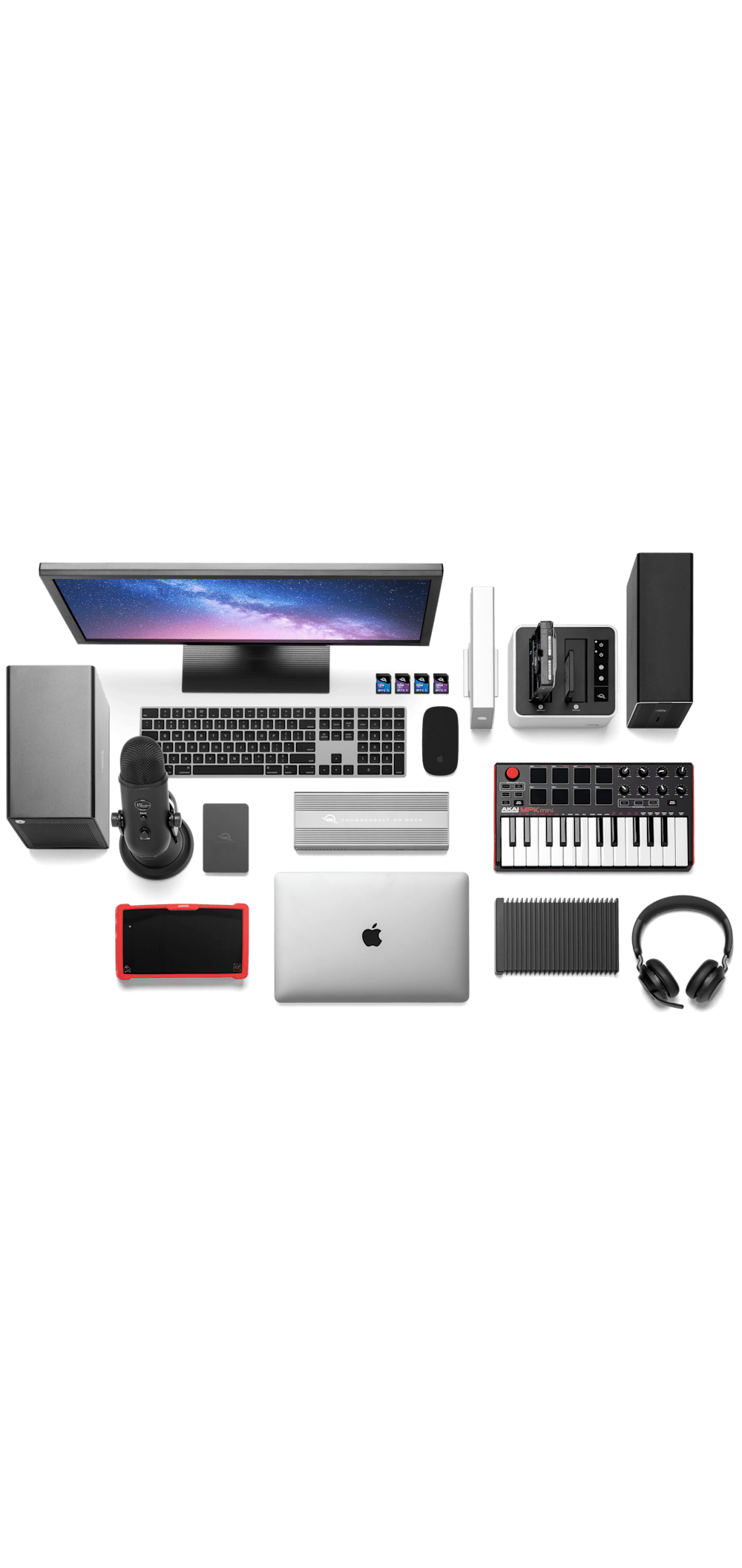
      Get ahead at work and play by connecting an incredible array of past, present, and future Thunderbolt and USB devices and accessories to the Thunderbolt Go Dock. Tap into high-performance storage capacity including NVMe solutions. Record and livestream with an A/V mixer. Expand your capabilities with a PCIe expansion enclosure. Enjoy the feel of your favorite keyboard and mouse. Nearly any connectivity need you have or want is possible with a diversity of Thunderbolt and USB ports.

      • Charge your laptop
      • Connect one 8K / up to two 4K monitors
      • Connect portable SSD storage
      • Connect large desktop RAID storage
      • Add an extra Thunderbolt port
      • Connect / charge USB drives, accessories and devices
      • Connect to IP based workflows / wired networks
      • Connect a digital audio interface
      • Read + Write SD Cards
      • Connect two Thunderbolt daisy-chains

      Intel® EVO™ and Thunderbolt™ Share logos

      Everything. Everywhere. Easier.
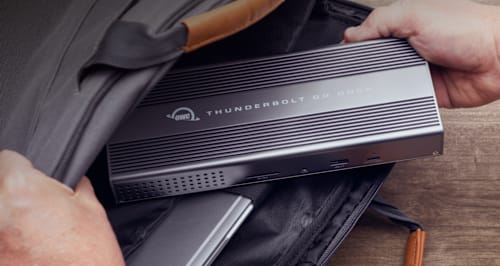
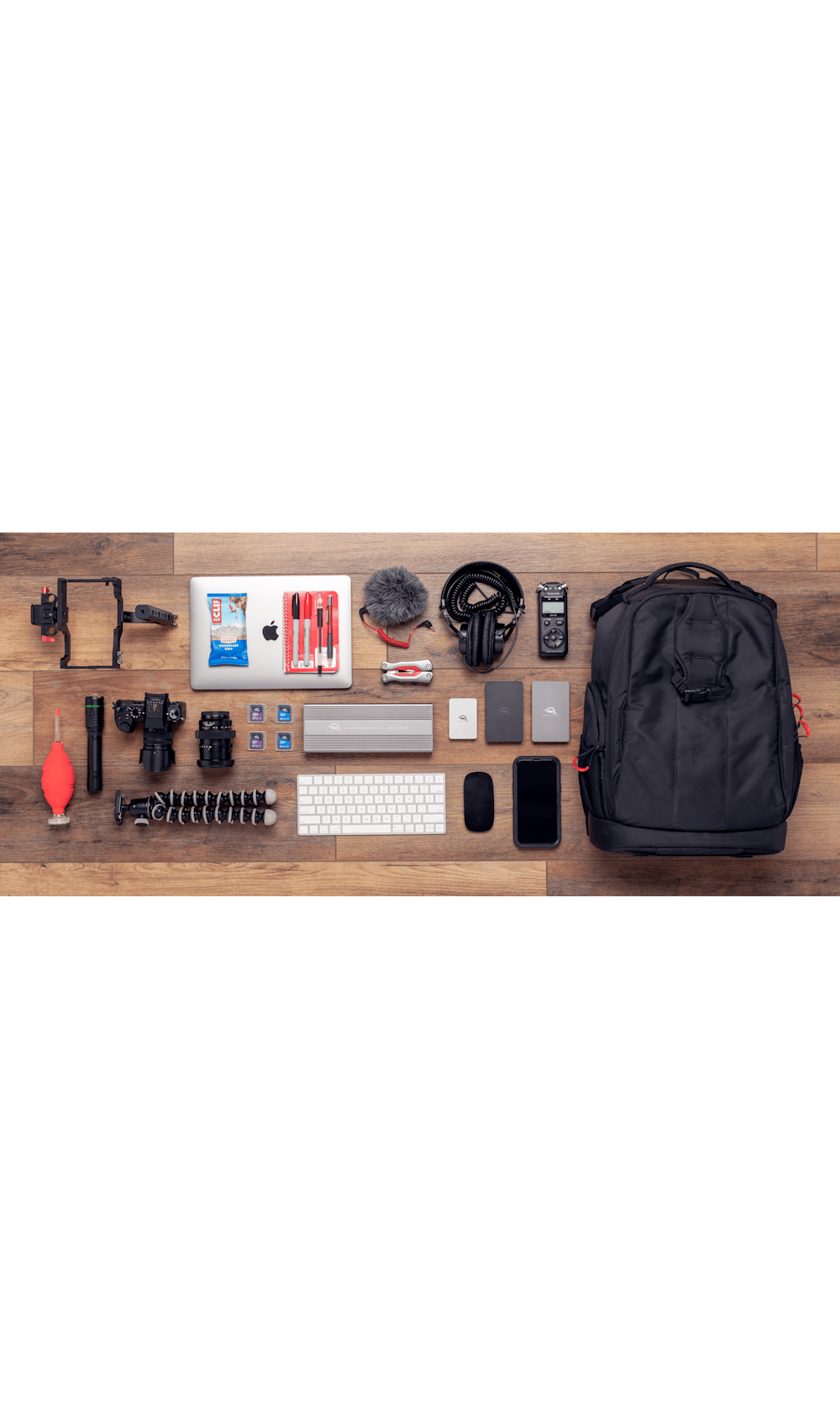
      While life is often full of compromises, your dock shouldn’t be. You should be able to move your workflow from the desktop to the road easily on short notice without having to choose what device or accessory to leave behind.

      Connect everything you want everywhere you call a workspace easily with the OWC Thunderbolt Go Dock. Say goodbye to a heavy, bulky power adapter slowing you down. Or a bus-powered mini dock not having the complete ports you need. Simply plug the power cable of this world’s first full-featured Thunderbolt dock with a built-in power supply into a standard outlet in coffee shops, airports, vehicles, video production carts, and more to put 11 ports of connectivity empowerment at your fingertips.

      Go Easier
      Built-in power supply eliminates heavy power brick hassle while enabling more workflows vs bus-powered docks.

      Go Connect
      Add all the external storage, multiple displays, and accessories you need with (3) Thunderbolt 4 ports, (3) USB-A ports, and (1) USB-C port.

      Go Everything
      One dock that works with all your Thunderbolt and USB-C devices.2

      Go Faster
      Enhance network-based workflows and transfer files up to 2.5x faster than standard 1GbE.

      Go Energized
      Keep your notebook travel ready with up to 90W charging power.

      Go Everywhere
      Enjoy mobile connectivity with a rugged, solid aluminum heat-dissipating fanless design.

      Go Managed
      Rest assured you can keep your devices managed with Go Dock’s MDM compatibility.

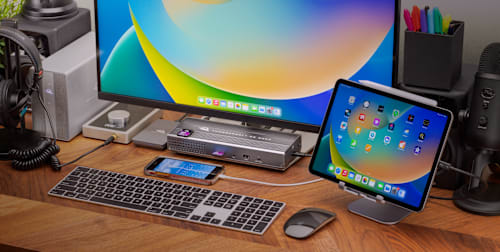
      OWC Thunderbolt Go Dock on desktop with Apple iPad

      Turn Your Tablet into a Computer

      With the Thunderbolt Go Dock, you can turn your tablet into a full computing platform with capabilities that exceed many desktop and notebook computer setups. Now you can transform one port on your tablet into 11 ports so you can read/write SD card media, share files in a blink on a high-speed network, free up your internal storage by offloading to an external drive, and work easier with a larger external display, mouse, and full-sized keyboard. You can even turn your tablet into a desktop video, audio, or podcasting recording and editing setup. The possibilities of how you can use the Thunderbolt Go Dock to redefine your tablet computing experience are nearly limitless.

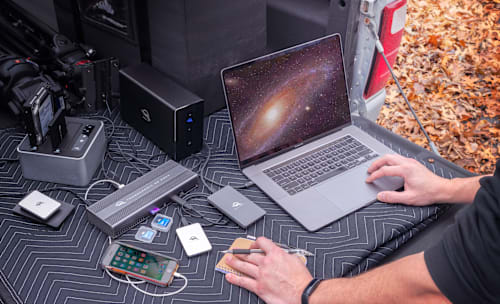
      OWC Thunderbolt Go Dock working mobile on tailgate

      When Mobile Is Better Than Portable

      You want to connect it all and have it all work flawlessly. While bus-powered portable docks are great for most common uses, they can only provide so much power from the host computer. When you want to push your abilities to the max, the mobile ready Thunderbolt Go Dock’s built-in power supply gives you the juice you need. And it lets you take a fabulous diversity of connectivity anywhere easier by eliminating the need to carry around a pain-in-the-neck/shoulder/back power brick.

      Thunderbolt and USB-C Ports

      A Multi-Connectivity Solution for Millions

      It’s a hassle trying to figure out or remember what interface your gear and computer has so you can use it all with a dock. Whether you have a Thunderbolt or USB-C Mac, PC, iPad, Chromebook, or Android device, the Thunderbolt Go Dock’s host port utilizes a USB-C connector to give you a multi-connectivity solution for millions of past, present, and future (yes even USB4!) computers and devices.1,2

      OWC Thunderbolt Go Dock with displays

      A Resolutionary Idea

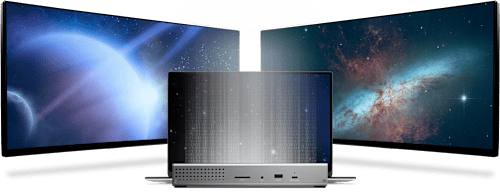
      As a digital nomad, hybrid employee, or creative production pro, you need to be able to expand your notebook’s single display – imagine…TWO 4K displays! - for maximum productivity at a temporary work location. Edit large format video on one 4K display while previewing the raw playback on a second 4K display. Whatever your workstation display needs, the Thunderbolt Go Dock gives you the vision to go to a higher level.3

      Whether your computer or tablet is sporting the latest technology or is a few years loved, the OWC Thunderbolt Go Dock gives you multiple options to expand your visual horizons:

      Single and Dual Display Support

      4K @ 30Hz 4K @ 60Hz Dual 4K @ 60Hz 5K @ 60Hz
      (Apple Studio Display or LG Ultrafine 5K)
      Dual 5K @ 60Hz
      (Apple Studio Display)
      6K @ 60Hz
      (Apple Pro XDR)
      Dual 6K @ 60Hz
      Apple Pro XDR
      8K @ 60Hz
      Apple silicon Mac (M1, M2)3
      Apple silicon Mac (M1 Pro, M1 Max, M1 Ultra, M2 Pro, M2 Max)3
      Intel Mac with Thunderbolt 33

      1

      2

      iPad Pro or iPad Air with Thunderbolt4
      iPad Pro with USB-C4
      iPad Air with USB-C4
      Chromebook
      Windows PC with Thunderbolt 4
      Windows PC with Thunderbolt 3 / USB45
      Windows PC with USB-C (10Gb/s with DisplayPort)
      Windows PC with USB-C (5Gb/s with DisplayPort)
      Windows Tablet
      1. See Apple Studio Display specs for detailed Mac model support.
      2. See Apple Pro Display XDR specs for detailed Mac model support.
      3. OWC highly recommends that you verify the display support for your specific Mac model:
        • Identify your MacBook Pro model
        • Identify your MacBook Air model
        • Identify your Mac mini model
        • Identify your iMac model
        • Identify your Mac Studio model
        • Identify your Mac Pro model
      4. OWC highly recommends that you verify the display support for your specific iPad model:
        • Identify your iPad model
      5. OWC recommends that you verify the display support for your PC's Thunderbolt port. Some refresh rates require DisplayPort 1.4 HBR3 and DSC 1.2 support from the display and the host. Not all Thunderbolt ports support DisplayPort 1.4 – some are limited to DisplayPort 1.2, which may reduce refresh rate or resolution support.

      USB-C
      Connect via Thunderbolt to experience the full 40Gb/s bandwidth your computer supports.

      Connect via USB-C 10Gb/s (non-Thunderbolt) to experience the full 10Gb/s bandwidth your computer supports.

      14 Features. Arriving to a Workstation Near You.

      The right dock makes all the difference and OWC designs the best Docks for about every need imaginable! We have over a decade of engineering experience providing the best in ports, reliability, and power delivery today. Whether for on your desktop, or on the road, the right OWC Dock provides you with the ports you need and connectivity you can count on.

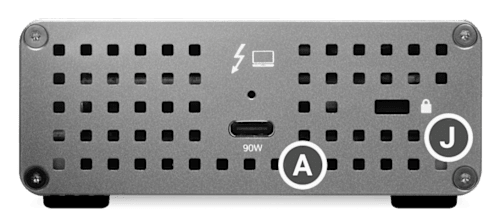
      A. (3) Thunderbolt 4 (USB-C) up to 40Gb/s (5,000MB/s) + power
      Expand the number of Thunderbolt ports you have available to connect more drives, displays, and accessories + charge your laptop with up to 90W of power.

      B. (1) USB-C port up to 10Gb/s (1250MB/s)
      Take advantage of USB-C drives and devices.5

      C. (2) USB-A ports up to 10Gb/s (1250MB/s)
      Connect to any USB device from the last 10+ years with ease.

      D. (1) USB 2.0 port
      Charge all kinds USB devices.

      E. (1) 2.5 Gigabit Ethernet port
      The fastest Ethernet interface available for Thunderbolt 4.

      F. (1) HDMI® 2.1 port with full HDR
      Connect to displays, TVs, and projectors.

      G. (1) SD card slot
      Ingest photos and videos in a snap.

      H. (1) 3.5mm stereo audio in/out
      Connect audio sources, speakers, and headphones.

      I. (1) Power plug in
      A built-in power supply means a simple power cable provides all the power you need without the need for a bulky power brick.

      J. (1) Security Slot
      Keep your dock from walking off. Keep it locked, secure, and safe.

      K. Built like a tank
      The “go anywhere” rugged-design handles your adventures on-the-road, in the office, and at home.

      OWC Thunderbolt Go Dock front viewOWC Thunderbolt Go Dock back view

      Keep your notebook and tablet ready for mobile use with the Thunderbolt Go Dock’s dedicated 90W power delivery Thunderbolt host port. You can also keep devices powered/charging on the other two Thunderbolt and four USB ports. Whether you’re taking a break or are done for the day, the Thunderbolt Go Dock continues to power and/or charge connected devices.

      OWC Thunderbolt Go Dock side view

      2.5x Faster + MDM

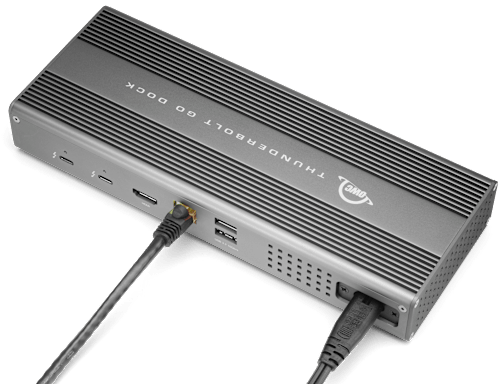
      Many of today’s computers and tablets either don’t provide a network port (ugh…slow low-quality Wi-Fi) or feature the older 1Gb/s standard. Now you can transfer, copy, and/or edit files and work up to 2.5x faster over wired networks and enjoy increased productivity in an IP-based workflow with the Thunderbolt Go Dock’s 2.5Gb/s Ethernet port. Or, connect to a NAS for faster data access, backup, and 4K video streaming and editing.4

      With MDM compatibility, OWC Docks make Mobile Device Management a breeze. Remote manage Go Dock empowered workstations across your organization. Other docks without MDM just don’t cut it.

      OWC Thunderbolt Go Dock with Ethernet cableOWC Thunderbolt Go Dock with Memory Cards

      Ingest in a Blink

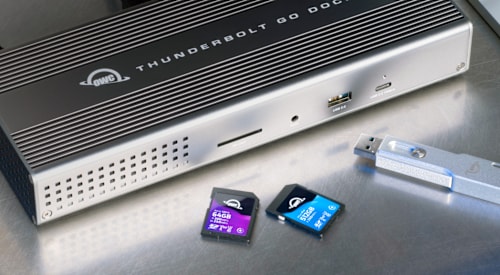
      Another “one less thing to carry” benefit for you is the built-in SD card reader. Video footage and photos are a part of daily life, and the Thunderbolt Go Dock lets you ingest your creative content conveniently fast. You can also use the reader like an external drive and store or backup files at will.

      Videographer in nature

      Go Multiple

      Transform a single Thunderbolt into dual Thunderbolt ports with the OWC Thunderbolt Go Dock. Take advantage of extra Thunderbolt ports to connect multiple Thunderbolt / USB-C drives, devices and SSDs to experience the fastest speed your devices can deliver. Utilize multiple daisy-chains to connect even more with your Go Dock empowered workflow.

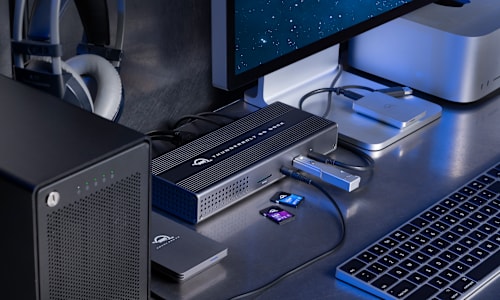
      OWC Thunderbolt Go Dock on deskOWC Thunderbolt Go Dock with IT Bag

      Simply Cleaner & Easier

      Having a built-in power supply with your Thunderbolt Go Dock keeps your life simple. With one less power brick in your desktop setup, there’s less clutter for cleaner cable management. When mobile with another dock, if you lost its power brick, you are dead in the water. If you happen to misplace the Thunderbolt Go Dock’s standard and common 2-prong "figure 8" power cord, you likely already have one you can “borrow” from another device or can easily stop in at a local store for a replacement and keep working.

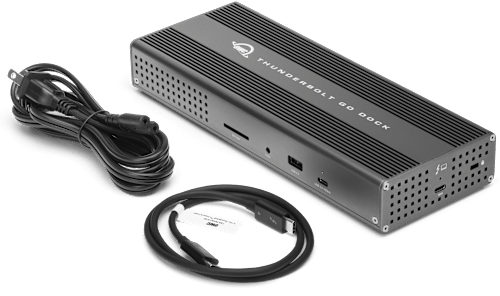
      OWC Thunderbolt Go Dock with cables

      USB-C, Thunderbolt 3, Thunderbolt 4, USB4 — What’s the Difference?

      Nowadays, there are so many different kinds of wires and connections. Watch as Michelle from Rocket Yard explores what’s what.

      Watch the video »

      What’s Apple’s “Thunderbolt / USB 4” vs. PC-Window’s Thunderbolt 4?

      I really like how Apple is presenting Thunderbolt as “Thunderbolt / USB 4“ on its latest Macs. You see, Thunderbolt 4 finally promises PC/Windows users all the features Thunderbolt 3 has long offered Apple users.

      Continue reading »

      Everything You Need to Know About Thunderbolt 4 & USB-C Cables

      Take all the guesswork out of identifying the cables you need for your technology setup with these backward-compatible cables that replace Thunderbolt 3 cables.

      OWC Dock Ejector

      Disconnect in One Click

      Safely disconnect multiple drives in a single click. OWC Dock Ejector was designed by OWC hardware and software engineers to ensure all data is written before disconnection, saving time and protecting against data loss. It makes losing your hard-earned work a thing of the past.

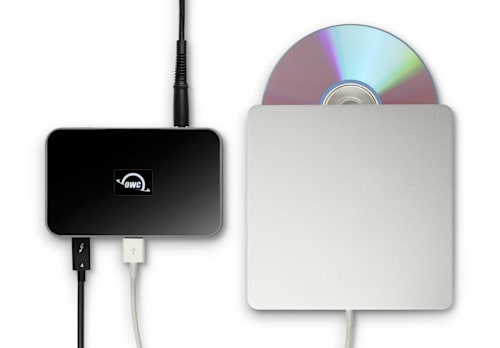
      Apple SuperDrive Ready

      Apple SuperDrive Ready

      OWC Dock Ejector software also includes a special driver that enables you to use an Apple SuperDrive with the Thunderbolt Go Dock. Just connect the SuperDrive to an open USB-A port on the dock for bus power to watch a DVD movie, listen to music CDs, create a backup disk, and install software.

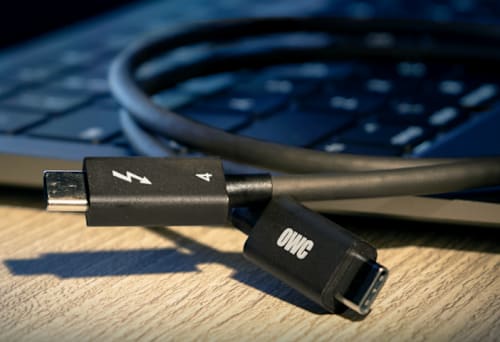
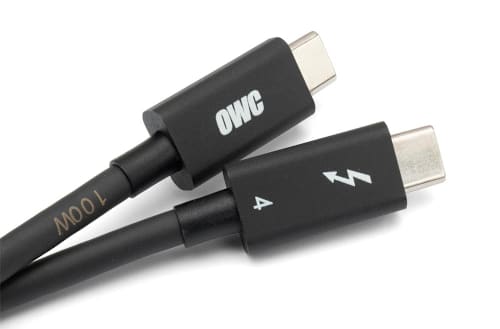
      OWC Thunderbolt Cable

      OWC Thunderbolt Cable Included
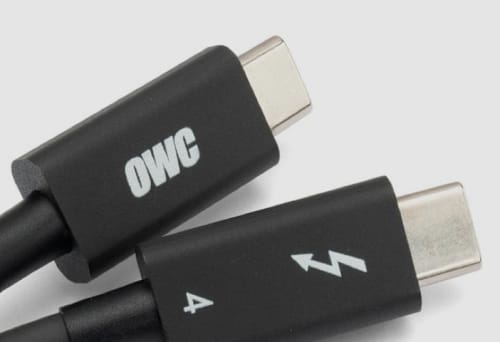
      OWC Thunderbolt Hub comes with a certified 0.8M OWC Thunderbolt (USB-C) Cable. But if your workflow demands a different length to make the connection, OWC Thunderbolt (USB-C) Cables are the perfect choice.

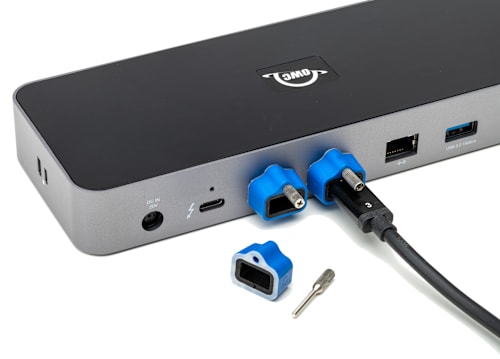
      OWC ClingOn

      Work with Ultimate Confidence

      Active workspaces expose gear to unexpected bumps and shoves. OWC ClingOn custom cable stabilizers (available separately) screw into the OWC Dock or OWC Drive housing to reduce – if not completely eliminate – cable strain on Thunderbolt and USB-C connections so you can work with ultimate confidence even in the highest foot traffic environments.

      OWC Innergize - Photographer on mountaintop

      Innergize Your Workflow with Highest Performance and Reliability

      OWC Innergize™ is the first stage of the Capture to Completion™ ecosystem of OWC products designed to seamlessly propel professional photographers, videographers, and content creators to the highest level of workflow performance and reliability. This OWC custom-designed app is a complete health, performance, and field upgrade management tool when using OWC Atlas memory cards with OWC Atlas readers and reader equipped products.

      Work with Maximum Confidence and Reliability

      OWC Innergize - Health

      Health
      Over time and use cycles, flash memory does wear out. Innergize verifies and reports the percentage of use life remaining. Now you can work with full confidence your OWC flash memory product will deliver the reliability you can trust.

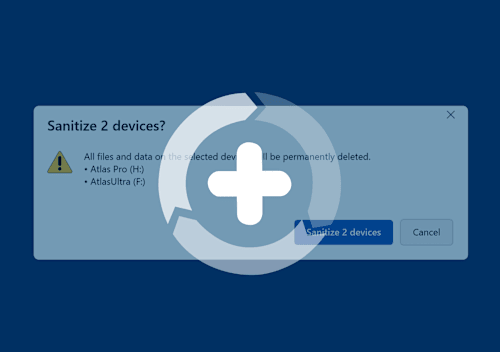
      OWC Innergize - Sanitize

      Sanitize
      Writes, deletes, and formatting all take their toll on memory cards. Innergize cleans and restores the flash memory performance of OWC memory cards so you can get the best results on every use.

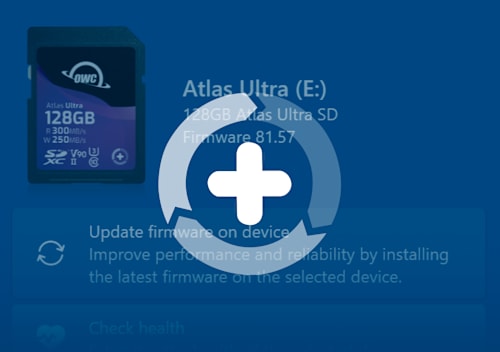
      OWC Innergize - Field Upgrade

      Field Upgrade

      When new cameras or firmware updates to existing cameras are introduced, they may not work properly with flash memory cards and drives. Innergize gives OWC memory card users the ability to quickly upgrade their firmware in the field for full compatibility, additional performance enhancements, and bug fixes for optimal reliability.

      1. Works with Thunderbolt 4, Thunderbolt 3, USB4, and USB host computers and mobile devices. Thunderbolt/Thunderbolt 2 Mac models are supported via USB-A host connection. Thunderbolt/Thunderbolt 2 host connection is not supported.
      2. Works with Thunderbolt (USB-C), Thunderbolt/Thunderbolt 2 (mDP), and USB devices. Thunderbolt/Thunderbolt 2 (mDP) device support requires a certified Thunderbolt 3 (USB-C) to Thunderbolt 2 (mDP) adapter and a Thunderbolt 2 cable (not available). This configuration provides data transfer at up to 20Gb/s but does not support notebook charging.
      3. Actual display support depends upon host. Please review the display specifications for your specific host system to determine the maximum supported resolution, refresh rate, color depth, and number of external displays over Thunderbolt or USB.
      4. Requires 2.5Gb/s Ethernet compatible hardware components and cabling (Cat 5e cable minimum, Cat 6 or later strongly recommended).
      5. Use of displays via USB-C (10Gb/s) port requires additional driver(s) and USB-C to HDMI adapter or USB-C to DisplayPort adapter (available separately).
      • Collections
      • Storage & Media
      • Dock

      Vendor: OWC OWC

      OWC Thunderbolt Go Dock 11-Port Solution w/ Built-in Power Supply

      Sale price$229.99Regular price $299.99

      SKU OWCTB4DKG11P

      Available to order — allow extra processing and shipping time

      Full manufacturer warranties on everything we sell
      14-day returns on new, unopened items
      Questions? Talk to a specialist — Mon–Fri 8:30–5 ET

      Introducing OWC Thunderbolt Go DockOWC Thunderbolt Go Dock with other devices

      Go Connect It All

      Get ahead at work and play by connecting an incredible array of past, present, and future Thunderbolt and USB devices and accessories to the Thunderbolt Go Dock. Tap into high-performance storage capacity including NVMe solutions. Record and livestream with an A/V mixer. Expand your capabilities with a PCIe expansion enclosure. Enjoy the feel of your favorite keyboard and mouse. Nearly any connectivity need you have or want is possible with a diversity of Thunderbolt and USB ports.

      • Charge your laptop
      • Connect one 8K / up to two 4K monitors
      • Connect portable SSD storage
      • Connect large desktop RAID storage
      • Add an extra Thunderbolt port
      • Connect / charge USB drives, accessories and devices
      • Connect to IP based workflows / wired networks
      • Connect a digital audio interface
      • Read + Write SD Cards
      • Connect two Thunderbolt daisy-chains

      Intel® EVO™ and Thunderbolt™ Share logos

      Everything. Everywhere. Easier.
      While life is often full of compromises, your dock shouldn’t be. You should be able to move your workflow from the desktop to the road easily on short notice without having to choose what device or accessory to leave behind.

      Connect everything you want everywhere you call a workspace easily with the OWC Thunderbolt Go Dock. Say goodbye to a heavy, bulky power adapter slowing you down. Or a bus-powered mini dock not having the complete ports you need. Simply plug the power cable of this world’s first full-featured Thunderbolt dock with a built-in power supply into a standard outlet in coffee shops, airports, vehicles, video production carts, and more to put 11 ports of connectivity empowerment at your fingertips.

      Go Easier
      Built-in power supply eliminates heavy power brick hassle while enabling more workflows vs bus-powered docks.

      Go Connect
      Add all the external storage, multiple displays, and accessories you need with (3) Thunderbolt 4 ports, (3) USB-A ports, and (1) USB-C port.

      Go Everything
      One dock that works with all your Thunderbolt and USB-C devices.2

      Go Faster
      Enhance network-based workflows and transfer files up to 2.5x faster than standard 1GbE.

      Go Energized
      Keep your notebook travel ready with up to 90W charging power.

      Go Everywhere
      Enjoy mobile connectivity with a rugged, solid aluminum heat-dissipating fanless design.

      Go Managed
      Rest assured you can keep your devices managed with Go Dock’s MDM compatibility.

      OWC Thunderbolt Go Dock on desktop with Apple iPad

      Turn Your Tablet into a Computer

      With the Thunderbolt Go Dock, you can turn your tablet into a full computing platform with capabilities that exceed many desktop and notebook computer setups. Now you can transform one port on your tablet into 11 ports so you can read/write SD card media, share files in a blink on a high-speed network, free up your internal storage by offloading to an external drive, and work easier with a larger external display, mouse, and full-sized keyboard. You can even turn your tablet into a desktop video, audio, or podcasting recording and editing setup. The possibilities of how you can use the Thunderbolt Go Dock to redefine your tablet computing experience are nearly limitless.

      OWC Thunderbolt Go Dock working mobile on tailgate

      When Mobile Is Better Than Portable

      You want to connect it all and have it all work flawlessly. While bus-powered portable docks are great for most common uses, they can only provide so much power from the host computer. When you want to push your abilities to the max, the mobile ready Thunderbolt Go Dock’s built-in power supply gives you the juice you need. And it lets you take a fabulous diversity of connectivity anywhere easier by eliminating the need to carry around a pain-in-the-neck/shoulder/back power brick.

      Thunderbolt and USB-C Ports

      A Multi-Connectivity Solution for Millions

      It’s a hassle trying to figure out or remember what interface your gear and computer has so you can use it all with a dock. Whether you have a Thunderbolt or USB-C Mac, PC, iPad, Chromebook, or Android device, the Thunderbolt Go Dock’s host port utilizes a USB-C connector to give you a multi-connectivity solution for millions of past, present, and future (yes even USB4!) computers and devices.1,2

      OWC Thunderbolt Go Dock with displays

      A Resolutionary Idea

      As a digital nomad, hybrid employee, or creative production pro, you need to be able to expand your notebook’s single display – imagine…TWO 4K displays! - for maximum productivity at a temporary work location. Edit large format video on one 4K display while previewing the raw playback on a second 4K display. Whatever your workstation display needs, the Thunderbolt Go Dock gives you the vision to go to a higher level.3

      Whether your computer or tablet is sporting the latest technology or is a few years loved, the OWC Thunderbolt Go Dock gives you multiple options to expand your visual horizons:

      Single and Dual Display Support

      4K @ 30Hz 4K @ 60Hz Dual 4K @ 60Hz 5K @ 60Hz
      (Apple Studio Display or LG Ultrafine 5K)
      Dual 5K @ 60Hz
      (Apple Studio Display)
      6K @ 60Hz
      (Apple Pro XDR)
      Dual 6K @ 60Hz
      Apple Pro XDR
      8K @ 60Hz
      Apple silicon Mac (M1, M2)3
      Apple silicon Mac (M1 Pro, M1 Max, M1 Ultra, M2 Pro, M2 Max)3
      Intel Mac with Thunderbolt 33

      1

      2

      iPad Pro or iPad Air with Thunderbolt4
      iPad Pro with USB-C4
      iPad Air with USB-C4
      Chromebook
      Windows PC with Thunderbolt 4
      Windows PC with Thunderbolt 3 / USB45
      Windows PC with USB-C (10Gb/s with DisplayPort)
      Windows PC with USB-C (5Gb/s with DisplayPort)
      Windows Tablet
      1. See Apple Studio Display specs for detailed Mac model support.
      2. See Apple Pro Display XDR specs for detailed Mac model support.
      3. OWC highly recommends that you verify the display support for your specific Mac model:
        • Identify your MacBook Pro model
        • Identify your MacBook Air model
        • Identify your Mac mini model
        • Identify your iMac model
        • Identify your Mac Studio model
        • Identify your Mac Pro model
      4. OWC highly recommends that you verify the display support for your specific iPad model:
        • Identify your iPad model
      5. OWC recommends that you verify the display support for your PC's Thunderbolt port. Some refresh rates require DisplayPort 1.4 HBR3 and DSC 1.2 support from the display and the host. Not all Thunderbolt ports support DisplayPort 1.4 – some are limited to DisplayPort 1.2, which may reduce refresh rate or resolution support.

      USB-C
      Connect via Thunderbolt to experience the full 40Gb/s bandwidth your computer supports.

      Connect via USB-C 10Gb/s (non-Thunderbolt) to experience the full 10Gb/s bandwidth your computer supports.

      14 Features. Arriving to a Workstation Near You.

      The right dock makes all the difference and OWC designs the best Docks for about every need imaginable! We have over a decade of engineering experience providing the best in ports, reliability, and power delivery today. Whether for on your desktop, or on the road, the right OWC Dock provides you with the ports you need and connectivity you can count on.

      A. (3) Thunderbolt 4 (USB-C) up to 40Gb/s (5,000MB/s) + power
      Expand the number of Thunderbolt ports you have available to connect more drives, displays, and accessories + charge your laptop with up to 90W of power.

      B. (1) USB-C port up to 10Gb/s (1250MB/s)
      Take advantage of USB-C drives and devices.5

      C. (2) USB-A ports up to 10Gb/s (1250MB/s)
      Connect to any USB device from the last 10+ years with ease.

      D. (1) USB 2.0 port
      Charge all kinds USB devices.

      E. (1) 2.5 Gigabit Ethernet port
      The fastest Ethernet interface available for Thunderbolt 4.

      F. (1) HDMI® 2.1 port with full HDR
      Connect to displays, TVs, and projectors.

      G. (1) SD card slot
      Ingest photos and videos in a snap.

      H. (1) 3.5mm stereo audio in/out
      Connect audio sources, speakers, and headphones.

      I. (1) Power plug in
      A built-in power supply means a simple power cable provides all the power you need without the need for a bulky power brick.

      J. (1) Security Slot
      Keep your dock from walking off. Keep it locked, secure, and safe.

      K. Built like a tank
      The “go anywhere” rugged-design handles your adventures on-the-road, in the office, and at home.

      OWC Thunderbolt Go Dock front viewOWC Thunderbolt Go Dock back view

      Keep your notebook and tablet ready for mobile use with the Thunderbolt Go Dock’s dedicated 90W power delivery Thunderbolt host port. You can also keep devices powered/charging on the other two Thunderbolt and four USB ports. Whether you’re taking a break or are done for the day, the Thunderbolt Go Dock continues to power and/or charge connected devices.

      OWC Thunderbolt Go Dock side view

      2.5x Faster + MDM

      Many of today’s computers and tablets either don’t provide a network port (ugh…slow low-quality Wi-Fi) or feature the older 1Gb/s standard. Now you can transfer, copy, and/or edit files and work up to 2.5x faster over wired networks and enjoy increased productivity in an IP-based workflow with the Thunderbolt Go Dock’s 2.5Gb/s Ethernet port. Or, connect to a NAS for faster data access, backup, and 4K video streaming and editing.4

      With MDM compatibility, OWC Docks make Mobile Device Management a breeze. Remote manage Go Dock empowered workstations across your organization. Other docks without MDM just don’t cut it.

      OWC Thunderbolt Go Dock with Ethernet cableOWC Thunderbolt Go Dock with Memory Cards

      Ingest in a Blink

      Another “one less thing to carry” benefit for you is the built-in SD card reader. Video footage and photos are a part of daily life, and the Thunderbolt Go Dock lets you ingest your creative content conveniently fast. You can also use the reader like an external drive and store or backup files at will.

      Videographer in nature

      Go Multiple

      Transform a single Thunderbolt into dual Thunderbolt ports with the OWC Thunderbolt Go Dock. Take advantage of extra Thunderbolt ports to connect multiple Thunderbolt / USB-C drives, devices and SSDs to experience the fastest speed your devices can deliver. Utilize multiple daisy-chains to connect even more with your Go Dock empowered workflow.

      OWC Thunderbolt Go Dock on deskOWC Thunderbolt Go Dock with IT Bag

      Simply Cleaner & Easier

      Having a built-in power supply with your Thunderbolt Go Dock keeps your life simple. With one less power brick in your desktop setup, there’s less clutter for cleaner cable management. When mobile with another dock, if you lost its power brick, you are dead in the water. If you happen to misplace the Thunderbolt Go Dock’s standard and common 2-prong "figure 8" power cord, you likely already have one you can “borrow” from another device or can easily stop in at a local store for a replacement and keep working.

      OWC Thunderbolt Go Dock with cables

      USB-C, Thunderbolt 3, Thunderbolt 4, USB4 — What’s the Difference?

      Nowadays, there are so many different kinds of wires and connections. Watch as Michelle from Rocket Yard explores what’s what.

      Watch the video »

      What’s Apple’s “Thunderbolt / USB 4” vs. PC-Window’s Thunderbolt 4?

      I really like how Apple is presenting Thunderbolt as “Thunderbolt / USB 4“ on its latest Macs. You see, Thunderbolt 4 finally promises PC/Windows users all the features Thunderbolt 3 has long offered Apple users.

      Continue reading »

      Everything You Need to Know About Thunderbolt 4 & USB-C Cables

      Take all the guesswork out of identifying the cables you need for your technology setup with these backward-compatible cables that replace Thunderbolt 3 cables.

      OWC Dock Ejector

      Disconnect in One Click

      Safely disconnect multiple drives in a single click. OWC Dock Ejector was designed by OWC hardware and software engineers to ensure all data is written before disconnection, saving time and protecting against data loss. It makes losing your hard-earned work a thing of the past.

      Apple SuperDrive Ready

      Apple SuperDrive Ready

      OWC Dock Ejector software also includes a special driver that enables you to use an Apple SuperDrive with the Thunderbolt Go Dock. Just connect the SuperDrive to an open USB-A port on the dock for bus power to watch a DVD movie, listen to music CDs, create a backup disk, and install software.

      OWC Thunderbolt Cable

      OWC Thunderbolt Cable Included
      OWC Thunderbolt Hub comes with a certified 0.8M OWC Thunderbolt (USB-C) Cable. But if your workflow demands a different length to make the connection, OWC Thunderbolt (USB-C) Cables are the perfect choice.

      OWC ClingOn

      Work with Ultimate Confidence

      Active workspaces expose gear to unexpected bumps and shoves. OWC ClingOn custom cable stabilizers (available separately) screw into the OWC Dock or OWC Drive housing to reduce – if not completely eliminate – cable strain on Thunderbolt and USB-C connections so you can work with ultimate confidence even in the highest foot traffic environments.

      OWC Innergize - Photographer on mountaintop

      Innergize Your Workflow with Highest Performance and Reliability

      OWC Innergize™ is the first stage of the Capture to Completion™ ecosystem of OWC products designed to seamlessly propel professional photographers, videographers, and content creators to the highest level of workflow performance and reliability. This OWC custom-designed app is a complete health, performance, and field upgrade management tool when using OWC Atlas memory cards with OWC Atlas readers and reader equipped products.

      Work with Maximum Confidence and Reliability

      OWC Innergize - Health

      Health
      Over time and use cycles, flash memory does wear out. Innergize verifies and reports the percentage of use life remaining. Now you can work with full confidence your OWC flash memory product will deliver the reliability you can trust.

      OWC Innergize - Sanitize

      Sanitize
      Writes, deletes, and formatting all take their toll on memory cards. Innergize cleans and restores the flash memory performance of OWC memory cards so you can get the best results on every use.

      OWC Innergize - Field Upgrade

      Field Upgrade

      When new cameras or firmware updates to existing cameras are introduced, they may not work properly with flash memory cards and drives. Innergize gives OWC memory card users the ability to quickly upgrade their firmware in the field for full compatibility, additional performance enhancements, and bug fixes for optimal reliability.

      1. Works with Thunderbolt 4, Thunderbolt 3, USB4, and USB host computers and mobile devices. Thunderbolt/Thunderbolt 2 Mac models are supported via USB-A host connection. Thunderbolt/Thunderbolt 2 host connection is not supported.
      2. Works with Thunderbolt (USB-C), Thunderbolt/Thunderbolt 2 (mDP), and USB devices. Thunderbolt/Thunderbolt 2 (mDP) device support requires a certified Thunderbolt 3 (USB-C) to Thunderbolt 2 (mDP) adapter and a Thunderbolt 2 cable (not available). This configuration provides data transfer at up to 20Gb/s but does not support notebook charging.
      3. Actual display support depends upon host. Please review the display specifications for your specific host system to determine the maximum supported resolution, refresh rate, color depth, and number of external displays over Thunderbolt or USB.
      4. Requires 2.5Gb/s Ethernet compatible hardware components and cabling (Cat 5e cable minimum, Cat 6 or later strongly recommended).
      5. Use of displays via USB-C (10Gb/s) port requires additional driver(s) and USB-C to HDMI adapter or USB-C to DisplayPort adapter (available separately).

      Pairs well with

      OWC Thunderbolt Go Dock 11-Port Solution w/ Built-in Power Supply

      OWC Thunderbolt Go Dock 11-Port Solution w/ Built-in Power Supply

      Sale price$229.99Regular price $299.99
      CineBits internal — do not follow

      Downloads

      • Manual Support Manual for OWC Thunderbolt Go Dock

      We know the gear

      Two decades each on set and in the field — real workflow expertise, not a call center.

      Fast, free shipping

      Free U.S. shipping on most orders over $500. In-stock orders ship same day.

      Real human support

      Talk to specialists who actually use this equipment — before and after you buy.

      Secure checkout

      Your payment and personal data are protected on every order.

      CineBitsCineBits full lockup, white ink with gold tagline, transparent

      CineBits is your destination for professional AV/Cinema gear. We come from decades on set — developing workflows and battle-testing equipment — so you walk away with the right gear and the knowledge to master your craft.

      Help
      • Contact Us
      • Financing
      • Upgrade Innovations Assembly Instructions
      • Shipping & Delivery
      • Returns & Refunds
      • Terms of Service
      Industries
      • Production
      • Houses of Worship
      • Education
      • Government & Military
      • Commercial & Sports
      • Storage Rentals
      Contact
      • 866-CINE-BIT
      • info@cinebits.co
      • Mon–Fri 8:30am–5pm Eastern
      • Same Day Shipping Cutoff 1pm

      News, guides & deals delivered to your e-mail:

      • Facebook
      • Instagram
      • LinkedIn
      © 2026 CineBits LLC. 
      • Choosing a selection results in a full page refresh.
      • Opens in a new window.