Skip to content
  • Facebook
  • Instagram
  • LinkedIn

Free shipping over $500!

Free U.S. shipping on most orders over $500!

$25 off $500+ · LAUNCH25

Launch offer: $25 off $500+ with LAUNCH25 · $50 off $1,000+ with LAUNCH50

$50 off $1,000+ · LAUNCH50

Bigger builds: $125 off $2,500+ with LAUNCH125 · $250 off $5,000+ with LAUNCH250

$125 off $2,500+ · LAUNCH125

Don't see it on the site? We can get it — e-mail us for a quote on the gear you need!

$250 off $5,000+ · LAUNCH250

Competitive pricing with a focus on service and knowledge.

  • All Products
  • Shop by Category
  • Shop by Brand
Login
  • Facebook
  • Instagram
  • LinkedIn
Search
CineBitsCineBits full lockup, white ink with gold tagline, transparentCineBits full lockup, white ink with gold tagline, transparentCineBits full lockup, white ink with gold tagline, transparentCineBits full lockup, white ink with gold tagline, transparent
  • All ProductsAll Products
  • Shop by CategoryShop by Category
      • Rigging
      • Monitors
      • Video
      • Audio
      • Storage
      • Cables
      • Power
      • Lenses
      • Cameras
      • Transport
      • Lighting
  • Shop by BrandShop by Brand
Search Login Cart 0
Cart

Your cart is currently empty.

  • Continue shopping
Spend $500.00 more to reach free shipping!
    Order special instructions
    Estimate shipping
    Discount
      Taxes and shipping calculated at checkout
      Subtotal
      $0.00 USD
      View cart
      Recently viewed
      Search

      We use cookies

      This site uses cookies for better user experience and analytics. View our privacy policy for more info.

      OWC Thunderbolt Pro Dock 10-Port Connectivity Solution for Mac/Windows
      OWC Thunderbolt Pro Dock 10-Port Connectivity Solution for Mac/Windows
      OWC Thunderbolt Pro Dock 10-Port Connectivity Solution for Mac/Windows
      OWC Thunderbolt Pro Dock 10-Port Connectivity Solution for Mac/Windows
      OWC Thunderbolt Pro Dock 10-Port Connectivity Solution for Mac/Windows
      OWC Thunderbolt Pro Dock

      High-Bandwidth and Flexibility for Demanding Hi-Res Workflow Needs

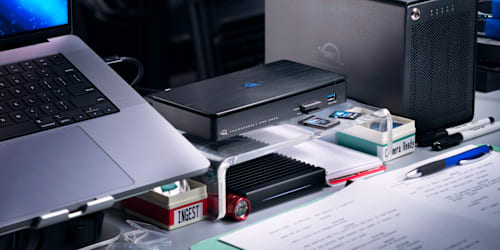
      Pro-level docking stations should be ready to handle any situation that you encounter in a production workflow. The OWC Thunderbolt Pro Dock is your on-location and post-production “mission control” with an unrivaled combination of super-fast 10Gb/s Ethernet, CFexpress and SD card readers, two Thunderbolt ports, one USB-C port, and three USB-A ports.

      With this unique productivity enhancing configuration, you can ingest RAW video and photo files at speeds up to 1630MB/s. Collaborate in a shared workflow environment via the 10Gb Ethernet port to keep your projects streaming from file setup to final renders with headroom to spare. View projects in greater detail with an 8K display or create a panoramic dual 4K display. Daisy chain up to five Thunderbolt devices. All while powering your laptop and managing the typical USB devices you need to get the job done.

      OWC Thunderbolt Pro Dock front detail OWC Thunderbolt Pro Dock back detail

      Add Media Versatility to DIT Carts

      When you’re on location, your cart needs the power of versatility. With conveniently accessible front-side CFexpress Type B and SD 4.0 card readers, the Thunderbolt Pro Dock helps you manage multiple card uploads efficiently. It’s a huge asset when you’re covering live events like conferences, festivals, and concerts where you’re working with multiple videographers and photographers.

      OWC Thunderbolt Pro Dock OWC Thunderbolt Pro Dock

      Calm & Connected
      In addition to eliminating the on-set or in studio chaos of multiple connections, the Thunderbolt Pro Dock’s solid aluminum fanless design lets you work in calm silence…even when transferring a huge file over a network.

      AVB Ready

      Time-sensitive data such as audio and video media streams require Audio Video Bridging (IEEE 802.1Qav, AVB) ready gear. No sweat… you can stream vast volumes of high-quality data to multiple destinations in real-time with very low latency over existing network cable via the Thunderbolt Pro Dock’s 10Gb Ethernet port.

      Small Footprint, Big Connections
      Sized similarly to a single external drive enclosure, the Thunderbolt Pro Dock’s aluminum case helps keep cart weight streamlined while easily fitting into a cart drawer or small box during cart breakdown.

      With two Thunderbolt 3 ports, the Thunderbolt Pro Dock offers incredible potential to connect multiple devices to take on the biggest projects. You can daisy-chain up to 5 additional Thunderbolt devices to the Thunderbolt Pro Dock for studio-level storage, RAID arrays, eGPUs for graphics processing, or all of these combined and connected at 40Gb/s bandwidth.

      Meet the challenges of any workflow with these Thunderbolt Pro Dock add-ons:

      • OWC ThunderBlade - the ultimate on-site workflow drive
      • OWC ThunderBay 4 - high-capacity RAID workstation
      • OWC Express 4M2 - compact, customizable 4-bay RAID array
      • OWC Envoy Pro FX - rugged and fast bus-powered portable SSD
      • OWC Mercury Helios 3S - high-end PCIe video, audio, and SSD card use

      Download the OWC guide to daisy-chaining to learn tips and tricks for the best connections.

      OWC Thunderbolt Pro Dock

      Conquers Workflows and Combats Clutter

      When you’re back in your office or studio, the Thunderbolt Pro Dock has the power and ports you need to manage your workflow and take control of your workspace. The Thunderbolt Pro Dock is compact, so you can comfortably manage your peripherals and keep your workspace free of clutter. Its 10Gb Ethernet connection keeps you connected at top speeds, and with 85W charging power, your notebook is charged up and ready to move.

      Thunderbolt Logo

      Thunderbolt Made Easy

      We make it easy to choose the right gear. Our Thunderbolt Certified products offer the same performance and functionality whether they are Thunderbolt 3 or Thunderbolt 4. And if you’re rocking a beloved Thunderbolt 2 machine, we offer a certified Thunderbolt 3 (USB-C) to Thunderbolt 2 Adapter so you can plug into our universe of award-winning solutions. No hassles, no confusion. That’s the OWC Difference.

      Apple Mac models with Thunderbolt 2/Thunderbolt ports can be connected using a certified Thunderbolt 3 (USB-C) to Thunderbolt 2 Adapter and a Thunderbolt 2 cable (not included). This configuration provides data transfer at up to 20Gb/s but does not support notebook charging.

      OWC Dock Ejector

      Disconnect in One Click

      Safely disconnect multiple drives in a single click. OWC Dock Ejector was designed by OWC hardware and software engineers to ensure all data is written before disconnection, saving time and protecting against data loss. It makes losing your hard-earned work a thing of the past.

      OWC Thunderbolt Cable

      OWC Thunderbolt Cable Included
      OWC Thunderbolt Pro Dock comes with a certified 0.7M OWC Thunderbolt Cable. But if your workflow demands a different length to make the connection, OWC Thunderbolt (USB-C) Cables are the perfect choice.

      OWC ClingOn

      Work with Ultimate Confidence

      Active workspaces expose gear to unexpected bumps and shoves. OWC ClingOn custom cable stabilizers (sold separately) screw into the OWC Dock or OWC Drive housing to reduce – if not completely eliminate – cable strain on Thunderbolt and USB-C connections so you can work with ultimate confidence even in the highest foot traffic environments.

      OWC Innergize - Photographer on mountaintop

      Innergize Your Workflow with Highest Performance and Reliability

      OWC Innergize™ is the first stage of the Capture to Completion™ ecosystem of OWC products designed to seamlessly propel professional photographers, videographers, and content creators to the highest level of workflow performance and reliability. This OWC custom-designed app is a complete health, performance, and field upgrade management tool when using OWC Atlas memory cards with OWC Atlas readers and reader equipped products.

      Work with Maximum Confidence and Reliability

      OWC Innergize - Health

      Health
      Over time and use cycles, flash memory does wear out. Innergize verifies and reports the percentage of use life remaining. Now you can work with full confidence your OWC flash memory product will deliver the reliability you can trust.

      OWC Innergize - Sanitize

      Sanitize
      Writes, deletes, and formatting all take their toll on memory cards. Innergize cleans and restores the flash memory performance of OWC memory cards so you can get the best results on every use.

      OWC Innergize - Field Upgrade

      Field Upgrade

      When new cameras or firmware updates to existing cameras are introduced, they may not work properly with flash memory cards and drives. Innergize gives OWC memory card users the ability to quickly upgrade their firmware in the field for full compatibility, additional performance enhancements, and bug fixes for optimal reliability.

      1. Use of HDMI display via Thunderbolt port requires USB-C to HDMI adapter sold separately.
      2. Based on time to transfer 4TB of 4K footage of 1 hour four seconds over 10GbE versus 10 hours forty four seconds over 1GbE.
      3. Router and/or Network Switch must support AVB.
      4. Up to 1630MB/s sequential read and up to 1326MB/s sequential write (max) performance was observed on a Windows 10 Enterprise PC equipped with a Gigabyte motherboard (Z270X-GAMING 7) with an Intel Core i5-7600K 3.8GHz processor and 16GB RAM running CrystalDiskMark 8.0.4, 1GB range, Q8T1. Up to 1547MB/s read and up to 1348MB/s write performance was observed on a MacBook Pro (13-inch, 2017, Two Thunderbolt 3 ports) with 8GB RAM and 2.3GHz processor running AJA System Test (5K resolution, 16GB file size, 16bit RGBA codec, single file test). Performance based on OWC Atlas Pro Ultra CFX card. Speeds can vary depending on card model and test environment.
      5. The OWC Thunderbolt Pro Dock supports DisplayPort 2.1 capabilities, so long as the connected host and display also support it. For use with a single display, Thunderbolt 4 supports resolutions up to 8K @ 120Hz or 4K @ 144Hz.
        • Please review the Apple silicon External Display Support support article for more details regarding how many displays can be connected to an Apple silicon Mac system.
        • Displays that do not have Display Stream Compression (DSC) will experience lower refresh rates.
      • Collections
      • Storage & Media
      • Dock

      Vendor: OWC OWC

      OWC Thunderbolt Pro Dock 10-Port Connectivity Solution for Mac/Windows

      $379.99

      SKU OWCTB3DKPRO

      Available to order — allow extra processing and shipping time
      Full manufacturer warranties on everything we sell
      14-day returns on new, unopened items
      Questions? Talk to a specialist — Mon–Fri 8:30–5 ET
      OWC Thunderbolt Pro Dock

      High-Bandwidth and Flexibility for Demanding Hi-Res Workflow Needs

      Pro-level docking stations should be ready to handle any situation that you encounter in a production workflow. The OWC Thunderbolt Pro Dock is your on-location and post-production “mission control” with an unrivaled combination of super-fast 10Gb/s Ethernet, CFexpress and SD card readers, two Thunderbolt ports, one USB-C port, and three USB-A ports.

      With this unique productivity enhancing configuration, you can ingest RAW video and photo files at speeds up to 1630MB/s. Collaborate in a shared workflow environment via the 10Gb Ethernet port to keep your projects streaming from file setup to final renders with headroom to spare. View projects in greater detail with an 8K display or create a panoramic dual 4K display. Daisy chain up to five Thunderbolt devices. All while powering your laptop and managing the typical USB devices you need to get the job done.
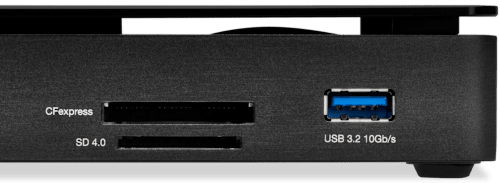

      OWC Thunderbolt Pro Dock front detail OWC Thunderbolt Pro Dock back detail

      Add Media Versatility to DIT Carts

      When you’re on location, your cart needs the power of versatility. With conveniently accessible front-side CFexpress Type B and SD 4.0 card readers, the Thunderbolt Pro Dock helps you manage multiple card uploads efficiently. It’s a huge asset when you’re covering live events like conferences, festivals, and concerts where you’re working with multiple videographers and photographers.
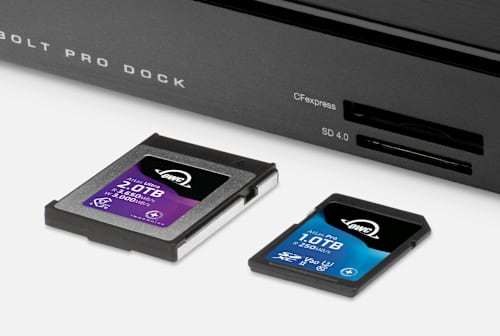
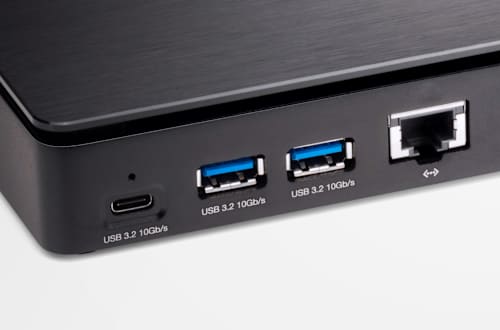
      OWC Thunderbolt Pro Dock OWC Thunderbolt Pro Dock

      Calm & Connected
      In addition to eliminating the on-set or in studio chaos of multiple connections, the Thunderbolt Pro Dock’s solid aluminum fanless design lets you work in calm silence…even when transferring a huge file over a network.

      AVB Ready

      Time-sensitive data such as audio and video media streams require Audio Video Bridging (IEEE 802.1Qav, AVB) ready gear. No sweat… you can stream vast volumes of high-quality data to multiple destinations in real-time with very low latency over existing network cable via the Thunderbolt Pro Dock’s 10Gb Ethernet port.

      Small Footprint, Big Connections
      Sized similarly to a single external drive enclosure, the Thunderbolt Pro Dock’s aluminum case helps keep cart weight streamlined while easily fitting into a cart drawer or small box during cart breakdown.

      With two Thunderbolt 3 ports, the Thunderbolt Pro Dock offers incredible potential to connect multiple devices to take on the biggest projects. You can daisy-chain up to 5 additional Thunderbolt devices to the Thunderbolt Pro Dock for studio-level storage, RAID arrays, eGPUs for graphics processing, or all of these combined and connected at 40Gb/s bandwidth.

      Meet the challenges of any workflow with these Thunderbolt Pro Dock add-ons:

      • OWC ThunderBlade - the ultimate on-site workflow drive
      • OWC ThunderBay 4 - high-capacity RAID workstation
      • OWC Express 4M2 - compact, customizable 4-bay RAID array
      • OWC Envoy Pro FX - rugged and fast bus-powered portable SSD
      • OWC Mercury Helios 3S - high-end PCIe video, audio, and SSD card use

      Download the OWC guide to daisy-chaining to learn tips and tricks for the best connections.

      OWC Thunderbolt Pro Dock

      Conquers Workflows and Combats Clutter

      When you’re back in your office or studio, the Thunderbolt Pro Dock has the power and ports you need to manage your workflow and take control of your workspace. The Thunderbolt Pro Dock is compact, so you can comfortably manage your peripherals and keep your workspace free of clutter. Its 10Gb Ethernet connection keeps you connected at top speeds, and with 85W charging power, your notebook is charged up and ready to move.

      Thunderbolt Logo

      Thunderbolt Made Easy

      We make it easy to choose the right gear. Our Thunderbolt Certified products offer the same performance and functionality whether they are Thunderbolt 3 or Thunderbolt 4. And if you’re rocking a beloved Thunderbolt 2 machine, we offer a certified Thunderbolt 3 (USB-C) to Thunderbolt 2 Adapter so you can plug into our universe of award-winning solutions. No hassles, no confusion. That’s the OWC Difference.

      Apple Mac models with Thunderbolt 2/Thunderbolt ports can be connected using a certified Thunderbolt 3 (USB-C) to Thunderbolt 2 Adapter and a Thunderbolt 2 cable (not included). This configuration provides data transfer at up to 20Gb/s but does not support notebook charging.

      OWC Dock Ejector

      Disconnect in One Click

      Safely disconnect multiple drives in a single click. OWC Dock Ejector was designed by OWC hardware and software engineers to ensure all data is written before disconnection, saving time and protecting against data loss. It makes losing your hard-earned work a thing of the past.
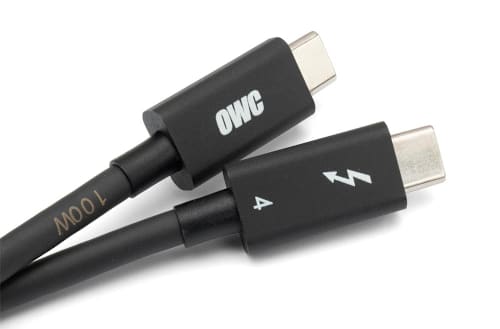
      OWC Thunderbolt Cable

      OWC Thunderbolt Cable Included
      OWC Thunderbolt Pro Dock comes with a certified 0.7M OWC Thunderbolt Cable. But if your workflow demands a different length to make the connection, OWC Thunderbolt (USB-C) Cables are the perfect choice.
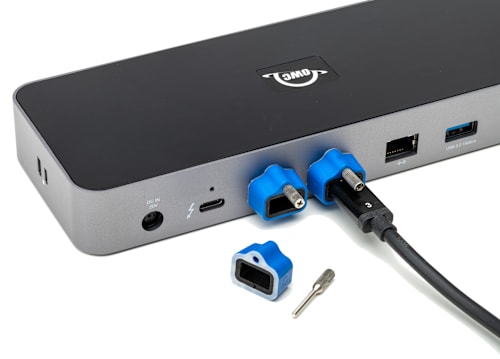
      OWC ClingOn

      Work with Ultimate Confidence

      Active workspaces expose gear to unexpected bumps and shoves. OWC ClingOn custom cable stabilizers (sold separately) screw into the OWC Dock or OWC Drive housing to reduce – if not completely eliminate – cable strain on Thunderbolt and USB-C connections so you can work with ultimate confidence even in the highest foot traffic environments.

      OWC Innergize - Photographer on mountaintop

      Innergize Your Workflow with Highest Performance and Reliability

      OWC Innergize™ is the first stage of the Capture to Completion™ ecosystem of OWC products designed to seamlessly propel professional photographers, videographers, and content creators to the highest level of workflow performance and reliability. This OWC custom-designed app is a complete health, performance, and field upgrade management tool when using OWC Atlas memory cards with OWC Atlas readers and reader equipped products.

      Work with Maximum Confidence and Reliability

      OWC Innergize - Health

      Health
      Over time and use cycles, flash memory does wear out. Innergize verifies and reports the percentage of use life remaining. Now you can work with full confidence your OWC flash memory product will deliver the reliability you can trust.

      OWC Innergize - Sanitize

      Sanitize
      Writes, deletes, and formatting all take their toll on memory cards. Innergize cleans and restores the flash memory performance of OWC memory cards so you can get the best results on every use.
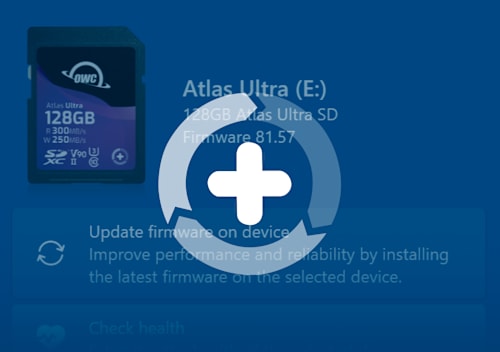
      OWC Innergize - Field Upgrade

      Field Upgrade

      When new cameras or firmware updates to existing cameras are introduced, they may not work properly with flash memory cards and drives. Innergize gives OWC memory card users the ability to quickly upgrade their firmware in the field for full compatibility, additional performance enhancements, and bug fixes for optimal reliability.

      1. Use of HDMI display via Thunderbolt port requires USB-C to HDMI adapter sold separately.
      2. Based on time to transfer 4TB of 4K footage of 1 hour four seconds over 10GbE versus 10 hours forty four seconds over 1GbE.
      3. Router and/or Network Switch must support AVB.
      4. Up to 1630MB/s sequential read and up to 1326MB/s sequential write (max) performance was observed on a Windows 10 Enterprise PC equipped with a Gigabyte motherboard (Z270X-GAMING 7) with an Intel Core i5-7600K 3.8GHz processor and 16GB RAM running CrystalDiskMark 8.0.4, 1GB range, Q8T1. Up to 1547MB/s read and up to 1348MB/s write performance was observed on a MacBook Pro (13-inch, 2017, Two Thunderbolt 3 ports) with 8GB RAM and 2.3GHz processor running AJA System Test (5K resolution, 16GB file size, 16bit RGBA codec, single file test). Performance based on OWC Atlas Pro Ultra CFX card. Speeds can vary depending on card model and test environment.
      5. The OWC Thunderbolt Pro Dock supports DisplayPort 2.1 capabilities, so long as the connected host and display also support it. For use with a single display, Thunderbolt 4 supports resolutions up to 8K @ 120Hz or 4K @ 144Hz.
        • Please review the Apple silicon External Display Support support article for more details regarding how many displays can be connected to an Apple silicon Mac system.
        • Displays that do not have Display Stream Compression (DSC) will experience lower refresh rates.

      Pairs well with

      OWC Thunderbolt Pro Dock 10-Port Connectivity Solution for Mac/Windows

      OWC Thunderbolt Pro Dock 10-Port Connectivity Solution for Mac/Windows

      $379.99
      CineBits internal — do not follow

      Downloads

      • Manual Support Manual for OWC Thunderbolt Pro Dock

      We know the gear

      Two decades each on set and in the field — real workflow expertise, not a call center.

      Fast, free shipping

      Free U.S. shipping on most orders over $500. In-stock orders ship same day.

      Real human support

      Talk to specialists who actually use this equipment — before and after you buy.

      Secure checkout

      Your payment and personal data are protected on every order.

      CineBitsCineBits full lockup, white ink with gold tagline, transparent

      CineBits is your destination for professional AV/Cinema gear. We come from decades on set — developing workflows and battle-testing equipment — so you walk away with the right gear and the knowledge to master your craft.

      Help
      • Contact Us
      • Financing
      • Upgrade Innovations Assembly Instructions
      • Shipping & Delivery
      • Returns & Refunds
      • Terms of Service
      Industries
      • Production
      • Houses of Worship
      • Education
      • Government & Military
      • Commercial & Sports
      • Storage Rentals
      Contact
      • 866-CINE-BIT
      • info@cinebits.co
      • Mon–Fri 8:30am–5pm Eastern
      • Same Day Shipping Cutoff 1pm

      News, guides & deals delivered to your e-mail:

      • Facebook
      • Instagram
      • LinkedIn
      © 2026 CineBits LLC. 
      • Choosing a selection results in a full page refresh.
      • Opens in a new window.